Affichage des articles dont le libellé est Open Source. Afficher tous les articles

Open Source OSINT Assistant: DataSploit

The various Open Source Intelligence (OSINT) tools used to capture data, gives the user all the relevant information about the domain / email / phone number / person, etc. It allows us to expand our attack/defense surface by collecting relevant information about the target.

DataSploit simply requires the minimum data (such as domain name, email ID, person name, etc. It is developed by using different programming languages that are popular among the field, that are Python, MongoDb and Django. Once the data is collected, firstly the noise is removed, after which data is correlated and after multiple iterations it is stored locally in a database which could be easily visualized on the UI provided. The sources provided are picked after complete analysis and are known to be providing reliable information.


Features:

  • Performs automated OSINT on a domain / email / username / phone and find out relevant information from different sources.
  • Useful for Pen-testers, Cyber Investigators, Product companies, defensive security professionals, etc.
  • Correlates and collaborate the results, show them in a consolidated manner.
  • Tries to find out credentials, api-keys, tokens, sub domains, domain history, legacy portals, etc. related to the target.
  • Available as single consolidating tool as well as standalone scripts.
  • Available in both GUI and Console.
Requirements:

  • MongoDb, Django, Celery and RabbitMq
  • Bunch of python libraries
    • amqp==1.4.9
    • anyjson==0.3.3
    • BeautifulSoup==3.2.1
    • beautifulsoup4==4.4.1
    • billiard==3.3.0.23
    • bs4==0.0.1
    • celery==3.1.23
    • clearbit==0.1.4
    • config==0.3.9
    • Django==1.9.8
    • django-celery==3.1.17
    • dnspython==1.14.0
    • future==0.15.2
    • idna==2.1
    • json2html==1.0.1
    • kombu==3.0.35
    • lxml==3.6.0
    • piplapis-python==5.1.0
    • pyinotify==0.9.6
    • pymongo==3.3.0
    • python-Wappalyzer==0.2.2
    • python-whois==0.6.2
    • pytz==2016.6.1
    • requests==2.10.0
    • requests-file==1.4
    • simplejson==3.8.2
    • six==1.10.0
    • tldextract==2.0.1
    • tqdm==4.7.6
    • termcolor
Download:


~ mardi 20 septembre 2016 0 commentaires

OSTrICa - Open Source Threat Intelligence Collector

OSTrICa stands for Open Source Threat Intelligence Collector and is an Open Source plugin-oriented framework to collect and visualize Threat Intelligence Information. Furthermore, OSTrICa is also the Italian word for oyster: that's where the logo come from.
SOC analysts, incident responders, attack investigators or cyber-security analysts need to correlate IoCs (Indicator of Compromise), network traffic patterns and any other collected data in order to get a real advantage against cyber-enemies. This is where threat intelligence comes into play, but unfortunately, not all the companies have enough budget to spend on Threat Intelligence Platform and Programs (TIPP); this is the main motivation behind OSTrICa's development.

OSTrICa - Open Source Threat Intelligence Collector

OSTrICa is a free and open source framework that allows everyone to automatically collect and visualize any sort of threat intelligence data harvested (IoCs), from open, internal and commercial sources using a plugin based architecture. The collected intelligence can be analysed by analysts but it can also be visualized in a graph format, suitable for link analysis. The visualized information can be filtered dynamically and can show, for example, connections between multiple malware based on remote connections, file names, mutex and so on so forth.


Download and read more at

~ dimanche 31 juillet 2016 0 commentaires

Open-Source Phishing Framework: gophish

Gophish is a phishing framework that makes the simulation of real-world phishing attacks dead-simple. The idea behind gophish is simple – make industry-grade phishing training available to everyone.
“Available” in this case means two things –
  • Affordable – Gophish is currently open-source software that is completely free for anyone to use.
  • Accessible – Gophish is written in the Go programming language. This has the benefit that gophish releases are compiled binaries with no dependencies. In a nutshell, this makes installation as simple as “download and run”!

Let’s take a look at some of the features that really set gophish apart and make it awesome.

Hosted On-Prem

There are many commercial offerings that provide phishing simulation/training. Unfortunately, these are SaaS solutions that require you to hand over your data to someone else.
Gophish is different in that it is meant to be hosted in-house. This keeps you data where it belongs - with you.

Download -> Run


For the few existing in-house solutions that exist, setup can be a huge pain (looking at you, Ruby gems). Your time is too valuable to be spent wrestling with dependencies trying to create the perfect setup that somehow magically allows the program to run.

Gophish was written in the Go programming language for this exact reason. To install gophish, all you have to do is download the zip file, extract the contents, and run the binary.
By doing this, you just started two webservers, populated a database, and setup a background worker to handle sending the mails. Now, your time can be spent making campaigns. Easy peasy.


API’s for Everything.

Gophish was built with automation first. This means that you can create scripts and clients that automate all the hard work for you. In addition to this, we keep up-to-date API docs that describe each API endpoint in detail.


~ jeudi 11 février 2016 0 commentaires

iOS Penetration Testing Lab Environment

Damn Vulnerable iOS App (DVIA) is an iOS application that is damn vulnerable. Its main goal is to provide a platform to mobile security enthusiasts/professionals or students to test their iOS penetration testing skills in a legal environment. This application covers all the common vulnerabilities found in iOS applications (following OWASP top 10 mobile risks) and contains several challenges that the user can try. This application also contains a section where a user can read various articles on iOS application security.


Vulnerabilities and Challenges Include …
  • Insecure Data Storage
  • Extension Vulnerabilities
  • Attacks on third party libraries
  • Jailbreak Detection
  • Runtime Manipulation
  • Piracy Detection
  • Sensitive information in memory
  • Transport Layer Security (http, https, cert pinning)
  • Client Side Injection
  • Information Disclosure
  • Broken Cryptography
  • Security Decisions via Untrusted input
  • Side channel data leakage
  • Application Patching
All these vulnerabilities and their solutions have been tested up to iOS 8.2
The app also contains a section on iOS Application Security Tutorials for those who want to learn iOS Application Pentesting. Every challenge/vulnerability has a link for a tutorial that users can read to learn more on that topic.

This app will only run on devices running iOS 7 or later. Users can download the source code and run the application on previous versions of iOS as well.

Download at

~ lundi 22 juin 2015 0 commentaires

Top 10 Open Source Web Testing Tools

Web Testing tools are used to find/identify bugs or errors in a website before it was launched officially for the public on the web. You can find many such tools on the web now a days some are also free.  Here is the list of the finest web testing tools available in the Open source market right now. These tools will not only help you identify the bugs/errors in your website before you launch it publicly but also save your time of finding the suitable Open source web testing tool. 


The Grinder  

The grinder is a Java load testing framework that makes it easy for you to run  disorganized testing with the help of many load injecting machines.
You can easily find this tools on web. The key features of this tool is Generic approach ( enables you to test anything that has a JAVA API) , Flexible scripting (Test scripts are written in the powerful Jython and Clojure languages) , Disrupted framework (allows you to control and monitor multiple load  injectors) and HTTP support (auto management of cookies and client connections).

Multi-Mechanize

This is an open source framework for performance and load-testing. Multi-Mechanize runs concurrent Python scripts to generate load (synthetic transactions) against a remote site or service. This Open-Source tool will help you to create programmatically test scripts to simulate virtual user activity. Afterwards it will generate HTTP requests to intelligently navigate a web site. 

Capybara

If you want to simplify process of integration testing Capybara is the best solution for you. This open source tools helps to simulate how a actual user would get across with a web application. It is agnostic about the driver running your tests and comes with Rack::Test and Selenium support built in. WebKit is supported through an external gem.

JMeter

JMeter is an open source software which is specifically designed for testing functional behavior and measure performance. It is used to test performance on both static and dynamic resources such as ( PHP, Java, Files, Perl scripts, Data Bases and Queries, FTP Servers and others). It can be used to simulate a heavy load on a server, group of servers, network or object to test its strength or to analyze overall performance under different load types.  

Selenium

Selenium is a suite which includes Selenium WebDrivers, Selenium IDE, Selenium Grid, Selenium Remote control which helps to test the web application. Selenium supports some of the largest web browsers like FireFox, IE,Safari,Opera,Chrome which allows you to record, edit, and debug tests. It is also the core technology in countless other browser automation tools, APIs and frameworks. 

PYLOT


 This is a free open source tool for testing performance and scalability of web services. It runs HTTP load tests, which are useful for capacity planning, benchmarking, analysis, and system tuning. This tool is designed for the developers, performance engineers and testers. For the full utilization of this open source tool the developer or the performance tester should have  a good idea about HTTP, XML, and performance testing. Some features of Pylton are HTTP and HTTPS (SSL) support, execution or monitoring console, automatic cookie handling, response verification with regular expressions, cross-platform, real-time stats and more. 

Webrat

Webrat is another open source tool which enables the developer to quickly write expressive and robust acceptance tests for a Ruby web application. It also supports frameworks like Merb, Rails and Sinatra. Webrat also supports the most popular test frameworks such as: Cucumber, RSpec, Test::Unit and Shoulda. 

OpenSTA 

Open System Testing Architecture (OpenSTA) is an open source tool which helps to perform scripted HTTP and HTTPS heavy load tests with performance measurements from Win32 platforms. The OpenSTA tools are designed for performance testing consultants or other technically proficient individuals. Results and statistics are collected during test runs by a variety of automatic and user controlled mechanisms. These can include scripted timers, SNMP data, Windows Performance Monitor stats and HTTP results & timings. The tools is free of cost because it is licensed under GPL (General Public License). 

Webload 

The WebLOAD Open Source Load Generation Engine is an open source project sponsored by RadView Software. This project is intended for ISVs, SIs and software developers who need to integrate a professional load generation engine into their applications. 

~ mercredi 15 avril 2015 0 commentaires

Open Source Browser-based P2P Encrypted Chat Service

If you are not think of becoming the President one day, if you are not involved in any illegal activity, if you do not keep anything back from your wife (some men may have a nervous smile on these words) or husband and you have no secrets from your boss – probably you should not steam your beam over encrypting personal conversations online. But even in this case, do not rush to conclusions. You will never know what may happen. What if one day you decide to become a big gun?

As you may have guessed, this article focuses on encryption of personal messages online. Most people (you are likely to be one of them) do not consider that most of their conversations contain any secrets. Yet, some written chat messages are better to be kept from surveillance of anyone you like: your chief, journalists, wife, etc. You are not going to hide anything from the police, are you? So many people would agree that the encryption of private conversations online is the right thing to do. But how it works?

Until recently the most common method to encipher personal conversations were to use the Pidgin client with installed Off-the-Record Messaging plugin. It supports multiple instant messaging protocols such as ICQ, Jabber (XMPP), etc. That is, if previously you were using, for example, the official ICQ client and you really loved it, now you will have to say goodbye to it, install Pidgin instead, link your account to other messaging protocols, download and install Off-the-Record Messaging plugin, configure it and … ta-dah! Now try to persuade your friends to do the same. A small remark to those geeks who still trust this method: even that does not fully protect your conversations, because a hacker can use logs stored on the centrilized servers.

Realizing all this most people may disappointedly give up on the idea of keeping personal conversations safe from the snooping eyes. But here is a good news. There's a free online service named OTR.to (shorted from Off-the-Record), meaning there's nothing on the record. It is very easy-to-use and can solve the problem of encryption completely. Just see for yourself.

This service is browser-based and requires no registration. So in order to start a private chat you should go to OTR , copy a generated URL and send it to a person you plan to talk to. On following the link, he/she will open a chat window.

Or you can send an automatically generated ID instead of the URL. The second method may seem more complicated than the first one, since your talker will have to open otr.to page by himself and paste the ID number there. However, it is very convenient. You can send a short ID in sms, dictate it over the phone or just send it using the owl post delivery (not meant to be serious).

So you have a chat window opened. You will see two buttons below, their names speak for itself: sound and encryption. In all other respects this a simple chat window, with the only difference that after closing your conversation disappears completely.

Another nice feature is the Self Destructing Message, the second tab in the main menu. This feature allows you to create a message that your recipient will read when it is convenient to him. You can tick 'Delete after reading' box, indicate the expiration time (from 5 minutes to 1 year), and you can activate 'Create message for every new line' (then you will have as many messages as the number of lines, each with its own password).


Once you have typed your message, press 'Create message'. You will get two URLs generated to choose from. The first contains the information about the password, so the person who receives this message encrypted will have just to click 'Decode Secret' to read it. The second URL does not have the information about the password, so you'll have to send a password, too. To maximize security you can give it through other communication channels. Thus, in order to read the message your recipient will have to follow the link, insert the password into a required field and click 'Decode Secret'.


Now some words about technical details of how it works. As stated on the site, otr.to is a p2p chat service, meaning that your computer and your friend communicate directly, so the logs are not stored on third-party servers. OTR (Off-the-Record Messaging) cryptographic protocol is the most secure for encryption. The project is open-source written in JavaScript, so anyone can see how the script works.

Therefore, otr.to service solves the problem of protecting personal conversations just perfect. For the first time neither you, nor your friend will be burdened with security measures.

~ jeudi 9 avril 2015 0 commentaires

Open Source Privacy Tools that Keeps you Safe from NSA

After the Gemalto security breach it is clear that Spy agencies like NSA use their Hackers to gain access to servers. Snowden documents showed that NSA goes beyond legal boundaries to keep an eye on the people at the name of National security. These security breaches by Spy agencies will never gonna stop. So it is up to users to secure their servers from the Hackers of these Spy agencies.We researched and came up with some most reliable open source privacy tools that even the NSA hackers can't crack.


1. PGP


PGP (Pretty Good Privacy) is a very secure open source tool developed by Phil Zimmermann. This tool is almost impossible to crack because PGP encryption uses a serial combination of hashing, data compression, symmetric-key cryptography, and finally public-key cryptography; each step uses one of several supported algorithms. The software was developed in earl 1990's and as the Snowden documents showed how the NSA can't crack the PGP. 


This doesn't mean that PGP has no flaws. There are two major flaws in this tool one is related to the experience of the user while the other flaw is a technical one. But even with these two flaw's the NSA failed to crack PGP with is a pretty amazing thing when you realize how easily this Spy agency is breaching the servers around the world.

PGP messages can't be "forward secure," so if a key is stolen, then all previous messages can be decrypted. As for the UX issue, it's well known by now that Glenn Greenwald almost missed the reporting on the Snowden documents by not being able to set up PGP properly. Right now it's too hard to use for most people.

2. OTR


Off The Recod (OTR)  is another privacy tool that will help to to secure your data from many Spy agencies. OTR is a cryptographic protocol which is used widely because of it has the power to encrypt every massage with a new key. The OTR was designed by Ian Goldberg and Nikita Borisov. OTR protocol is used in multiple clients including in Pidgin, Jitsi and Adium for desktop or in mobile clients such as CryptoCat and ChatSecure.

The main objective behind this protocol is providing deniable authentication for the person or group while keeping the conversation between two parties confidential like in real life when people are discussing something behind closed doors.  The documents leaked by Snowden didn't say anything about TextSecure's Axolotl because it dated back to 2012 or before that when Axolotl was not created.

3. Tor 


Tor is a software that cost you nothing and helps you to communicate anonymously. Tor was released in 2002 and need OS like windows or Linux to run smoothly. Tor and Tor browser has made it very difficult for the NSA to have a track of those who are using it. But it is not impossible for the NSA to track the people who are on their target if even they are using Tor services. But this can be possible if the person didn't updated his Tor browser with latest patches.

If your Tor browser if upto date the it is an impossible task for even NSA to have a track of you. But still there are some mistakes that the person who is on target can make to get caught.  Such as log-in to the accounts that uses their real name and addresses. So, its pretty clear now that Tor can help you to be anonymous but you also have to sharp if you do not wanna get caught, 

4. Tails


The basic function of this Linux based OS is to preserve privacy and anonymity. Its all outgoings are forced to go through Tor which helps to user to remain anonymous. That's why it is very hard to agencies like NSA to identify a certain person who they really are. The one thing that can get you caught is if you are using Tails as your main machine. Because when you log-in to your personal email account or even your social networking site anyone who is tracking you will know who you are. So never use Tails as your main machine if you wanna remain anonymous. 

If you want some more security then Tails can be used from a DVD, ensuring no malware that's meant to expose you can be written to it. Then, every time you use Tails it will be like using a clean install of it. Which is a pretty good solution of your problem. 


~ mardi 24 février 2015 0 commentaires

Control a Remote Phone via Webserver - Android Security

An app that can record phones, sms, track location changes, silently take pictures etc. and watch all the fun beeing uploaded to a webconsole from where you control the smartphone with dynamic updates using WEBVIEW.

This software consists of three parts: source for installing app on android device (in AndroidAntiTheft folder) webserver with all necessary scripts/files to control remote phone (in admin_panel folder) DB (in folder DB) additionally a older compiled apk file is attached a swell - ready to download and install on your device.

what it does

the application "acts" as an antitheft software. The moment you install it it helps you track your phone. with an IMEA code displayed after staring you can log into the webserver and see where your phone is. This is the non malicious part. The malicious part: the admin (hacker) in this security demo can also log into another part of the webserver and enable installed features within the app (hidden to the user). He can activate features like phone recording, sms recording etc. all enabled features result in an stealth upload of all data to the webserver, where the admin can take a closer look at the data.


You can download the source by clicking on "Source". Then navigate to "browse". Then navigate to the correct tree (most times its trunk". On the right side you will find the files. If you wan't to download e.g. an already comiled exe you can click on the "exe" in the right window. It will tell you that the file is too big to display. But on the left side you can still see a link "view raw file". Right mouse click on that and "save as". you will then be able to save the exe. In case you want to only download the already compiled version (not source code included please click on this link:

Source: https://drive.google.com/file/d/0Bxfib9ZpfZLaOGRVa1pFRnBVOVE/edit?usp=sharing Admin Panel: https://drive.google.com/file/d/0Bxfib9ZpfZLaQ2JBSXNnaG1STDA/edit?usp=sharing Old APK (compile new one!): https://drive.google.com/file/d/0Bxfib9ZpfZLaaFRkVVkxaWFvUEU/edit?usp=sharing

~ mercredi 28 janvier 2015 1 commentaires

Detekt to Resist Government Surveillance

It has been well documented that governments are using surveillance technology to target human rights defenders, journalists, NGOs, political opponents, religious or ethnic minorities and to conduct countrywide surveillance.

In recent years we have witnessed a huge growth in the adoption and trade in communication surveillance technologies. Such spyware provides the ability to read personal emails, listen-in skype conversations or even remotely turn on a computers camera and microphone without its owner knowing about it.


Some of this software is widely available on the Internet, while some more sophisticated alternatives are made and sold by private companies based in industrialized countries to state law enforcement and intelligence agencies in countries across the world. 


There is little to no regulation currently in place to safeguard against these technologies being sold or used by repressive governments or others who are likely to use them for serious human rights violations and abuses.

What is Detekt?


Detekt is a free tool that scans your Windows computer for traces of FinFisher and Hacking Team RCS, commercial surveillance spyware that has been identified to be also used to target and monitor human rights defenders and journalists around the world.


If you suspect you are at risk of targeted surveillance you should always seek and follow security advice to ensure you protect yourself and others in your digital communications. 


It is important to underline that if Detekt does not find trace of spyware on a computer, it does not necessarily mean that none is present. Some spyware will likely be updated in response to the release of Detekt in order to avoid detection. In addition, there may be existing versions of spyware, from these or other providers, which are not detected by this tool.


Downlaod detekt from github


Is Detekt for me?

If you suspect that your work or activities put you at risk of targeted surveillance you may wish to use Detekt to scan your computer for traces of known spyware.

How Does it Work?

Before launching the tool, close all applications and make sure the computer is disconnected from the Internet. if spyware is detected, you should not reconnect the computer to the Internet again until it has been cleaned. We recommend that you disable your Antivirus software to prevent possible interference or false positives.

Get the complete tutorial from the official website.

~ jeudi 15 janvier 2015 0 commentaires

Weevely PHP Stealth Web Backdoor Kali Linux

Weevely is a stealth PHP web shell that simulate an SSH-like connection. It is an essential tool for web application post exploitation, and can be used as stealth backdoor or as a web shell to manage legit web accounts, even free hosted ones. After hacking into a website, a penetration tester used to install/configure his/her backdoor on the web server to remotely connect with the hacked server; the purpose to install the web backdoor is vary and it totally depends on the nature of attack, however the configuration process is almost same for all type of attack.

The success of any hacking attack and its post exploitation is highly depends on the technique and the tools, Weevely is one of the renowned tool to get a shell access of a web server. It is available on Kali linux and other Linux distribution by default. Weevely is composed of more than 30 modules to automate administration and post exploitation tasks:

  • Execute commands and browse remote filesystem, even with PHP security restriction
  • Audit common server misconfigurations
  • Run SQL console pivoting on target machine
  • Proxy your HTTP traffic through target
  • Mount target filesystem to local mount point
  • File transfer from and to target
  • Spawn reverse and direct TCP shells
  • Bruteforce SQL accounts through target system users
  • Run port scans from target machine
  • And so on..

The other notable functions of weevely are:

  • Backdoor communications are hidden in HTTP Cookies
  • Communications are obfuscated to bypass NIDS signature detection
  • Backdoor polymorphic PHP code is obfuscated to avoid HIDS AV detection

If you are not using Kali or any other Linux distribution created for hacking/penetration testing then you have the python script of weevely from github.com

For the tutorial purpose, I am using Kali linux:

Click on the terminal and type weevely for the basic window.


To create a PHP backdoor, follow the command:

weevely generate


After that, all you need to do is just upload your backdoor on the hacked server, and you can communicate to your backdoor by using the following command:

weevely

After making connection with the server, many tasks can be executed; for example:

| :shell.sh | System shell
| :shell.php | PHP shell
| :system.info | Collect system informations
| :find.perms | Find files with write, read, execute permissions
| :find.suidsgid | Find files with superuser flags
| :backdoor.reversetcp | Send reverse TCP shell
| :backdoor.tcp | Open a shell on TCP port
| :bruteforce.sql | Bruteforce SQL username


~ mardi 9 décembre 2014 0 commentaires

ZMap: Open-Source Network Scanner

Network scanning is the most important part of the information gathering process that a hacker penetration tester performs at its very first step; the result of network scanning give an extensive  information about the network, its OS, installed IDS/IPS and firewalls, open ports and many other important information.

Selecting the right tool for the principle job is an art, and you are the artist. So select your hacking weapon wisely and if we talk about network scanning then we have Nmap (I think it does not need any introduction, right?). Undoubtedly Nmap is the smart tool that has an ability to get most of the job done but nmap is not the end, we have many other tools and they also have their own merits and demerits and one of them is ZMap.

What is ZMap?

ZMap is an open-source network scanner that enables researchers to easily perform Internet-wide network studies. With a single machine and a well provisioned network uplink, ZMap is capable of performing a complete scan of the IPv4 address space in under 5 minutes, approaching the theoretical limit of ten gigabit Ethernet.


ZMap can be used to study protocol adoption over time, monitor service availability, and help us better understand large systems distributed across the Internet.

ZMap Examples

By default, ZMap will perform a TCP SYN scan on the specified port at the maximum rate possible. A more conservative configuration that will scan 10,000 random addresses on port 80 at a maximum 10 Mbps can be run as follows:

$ zmap --bandwidth=10M --target-port=80 --max-targets=10000 --output-file=results.csv 

Or more concisely specified as:

$ zmap -B 10M -p 80 -n 10000 -o results.csv
 
ZMap can also be used to scan specific subnets or CIDR blocks. For example, to scan only 10.0.0.0/8 and 192.168.0.0/16 on port 80, run:

zmap -p 80 -o results.csv 10.0.0.0/8 192.168.0.0/16
 
If the scan started successfully, ZMap will output status updates every one second similar to the following:

0% (1h51m left); send: 28777 562 Kp/s (560 Kp/s avg); recv: 1192 248 p/s (231 p/s avg); hits: 0.04%
0% (1h51m left); send: 34320 554 Kp/s (559 Kp/s avg); recv: 1442 249 p/s (234 p/s avg); hits: 0.04%
0% (1h50m left); send: 39676 535 Kp/s (555 Kp/s avg); recv: 1663 220 p/s (232 p/s avg); hits: 0.04%
0% (1h50m left); send: 45372 570 Kp/s (557 Kp/s avg); recv: 1890 226 p/s (232 p/s avg); hits: 0.04%

These updates provide information about the current state of the scan and are of the following form: %-complete (est time remaining); packets-sent curr-send-rate (avg-send-rate); recv: packets-recv recv-rate (avg-recv-rate); hits: hit-rate.

If you do not know the scan rate that your network can support, you may want to experiment with different scan rates or bandwidth limits to find the fastest rate that your network can support before you see decreased results.

Download Zmap and learn more here


~ lundi 10 novembre 2014 0 commentaires

Google releases 'nogotofail' A Network Traffic Security Testing Tool

Google has released Nogotofail as an open source project available on GitHub, meaning anyone can use it, contribute new features, provide support for more platforms, and do anything else with the end goal of helping to improve the security of the Internet.


Called 'nogotofail' and apparently named in honour of the 'goto fail' bug that affected Mac and iOS systems earlier this year, the tool offers a way to confirm that internet-connected devices and applications aren't vulnerable to transport layer security (TLS) and secure sockets layer (SSL) encryption issues, such as known bugs or misconfigurations.

Nogotofail tests for common SSL certificate verification issues, HTTPS and TLS/SSL library bugs, SSL and STARTTLS stripping issues, and cleartext issues. The tool can be deployed on a router, a Linux machine, or a VPN server and works for Android, Chrome OS, iOS, Linux, OS X, and Windows — basically any device used to connect to the internet.


Following is the official release of Google:

"Google is committed to increasing the use of TLS/SSL in all applications and services. But “HTTPS everywhere” is not enough; it also needs to be used correctly. Most platforms and devices have secure defaults, but some applications and libraries override the defaults for the worse, and in some instances we’ve seen platforms make mistakes as well. As applications get more complex, connect to more services, and use more third party libraries, it becomes easier to introduce these types of mistakes.

The Android Security Team has built a tool, called nogotofail, that provides an easy way to confirm that the devices or applications you are using are safe against known TLS/SSL vulnerabilities and misconfigurations. Nogotofail works for Android, iOS, Linux, Windows, Chrome OS, OSX, in fact any device you use to connect to the Internet. There’s an easy-to-use client to configure the settings and get notifications on Android and Linux, as well as the attack engine itself which can be deployed as a router, VPN server, or proxy.

We’ve been using this tool ourselves for some time and have worked with many developers to improve the security of their apps. But we want the use of TLS/SSL to advance as quickly as possible. Today, we’re releasing it as an open source project, so anyone can test their applications, contribute new features, provide support for more platforms, and help improve the security of the Internet."

~ vendredi 7 novembre 2014 0 commentaires

Source Code Analyzer for PHP Vulnerabilities - RIPS

The World Wide Web grew rapidly during the last decades and is used by millions of people every day for online shopping, banking, networking, and other activities. Many of these websites are developed with PHP, the most popular scripting language on the Web. However, PHP code is prone to different types of critical security vulnerabilities that can lead to data leakage, server compromise, or attacks against an application’s users. This problem can be addressed by analyzing the source code of the application for security vulnerabilities before the application is deployed on a web server. Novel approach is presented for the precise static analysis of PHP code to detect security vulnerabilities in web applications. As dismissed by previous work in this area, a comprehensive configuration and simulation of over 900 PHP built-in features allows us to precisely model the highly dynamic PHP language. By performing an intra- and inter-procedural data flow analysis and by creating block and function summaries, we are able to efficiently perform a backward-directed taint analysis for 20 different types of vulnerabilities. Furthermore, string analysis enables us to validate sanitization in a context-sensitive manner. Our method is the first to perform fine-grained analysis of the interaction between different types of sanitization, encoding, sources, sinks, markup contexts, and PHP settings. We implemented a prototype of our approach in a tool called RIPS. Our evaluation shows that RIPS is capable of finding severe vulnerabilities in popular real world applications: we reported 73 previously unknown vulnerabilities in five well-known PHP applications such as phpBB, osCommerce, and the conference management software HotCRP.

What is RIPS

RIPS is a tool written in PHP to find vulnerabilities in PHP applications using static code analysis. By tokenizing and parsing all source code files RIPS is able to transform PHP source code into a program model and to detect sensitive sinks (potentially vulnerable functions) that can be tainted by userinput (influenced by a malicious user) during the program flow. Besides the structured output of found vulnerabilities RIPS also offers an integrated code audit framework for further manual analysis. 


Features

  • scan and vulnerability statistics
  • grouped vulnerable code lines (bottom up or top down)
  • vulnerability description with example code, PoC, patch
  • exploit creator
  • file list and graph (connected by includes)
  • function list and graph (connected by calls)
  • userinput list (application parameters)
  • source code viewer with highlighting
  • active jumping between function calls
  • search through code by regular expression
  • 8 syntax highlighting designs
  • Code Execution
  • Command Execution
  • Cross-Site Scripting
  • Header Injection
  • File Disclosure
  • File Inclusion
  • File Manipulation
  • LDAP Injection
  • SQL Injection
Download & read more here:

~ mardi 21 octobre 2014 0 commentaires

MobiSec Mobile Penetration Testing

Mobile technology has changed the way we communicate; now smartphones and applications running on these phones are crucial for any organization. The corporate sector using the technology for their day to day operation, hence the risk and the hacking attacks have drastically increased; the purpose is understood, to steal information or damage everything. Now it a job of penetration tester to make the envirenment secure and for mobile devices and applications we have Mobisec.

The objective of a security researcher and penetration tester is to test the mobile environment and give a clean chit to the management regarding the security of the environment so that they can make it live and then thing goes on.  

What is Mobisec ? 

The MobiSec Live Environment Mobile Testing open source project is a live environment for testing mobile environments, including devices, applications, and supporting infrastructure. The purpose is to provide attackers and defenders the ability to test their mobile environments to identify design weaknesses and vulnerabilities.


 MobiSec provides a single environment for testers to leverage the best of all available open source mobile testing tools, as well as the ability to install additional tools and platforms, that will aid the penetration tester through the testing process as the environment is structured and organized based on an industry-proven testing framework. Using a live environment provides penetration testers the ability to boot the MobiSec Live Environment on any Intel-based system from a DVD or USB flash drive, or run the test environment within a virtual machine.

Mobisec Installation

The MobiSec Live Environment can be installed onto a DVD, onto a USB flash drive, or onto a Virtual Machine. The instructions below are provided to assist the user in how to download and install based on the desired method.
To login to MobiSec, use the following credentials

username = mobisec
password = mobisec

Click here for the instruction
Download
Source

~ lundi 25 août 2014 0 commentaires

Wireless Auditing, Intrusion Detection & Prevention System

WAIDPS is an open source wireless swissknife written in Python and work on Linux environment. This is a multipurpose tools designed for audit (penetration testing) networks, detect wireless intrusion (WEP/WPA/WPS attacks) and also intrusion prevention (stopping station from associating to access point). Apart from these, it will harvest all WiFi information in the surrounding and store in databases. This will be useful when it comes to auditing a network if the access point is ‘MAC filtered’ or ‘hidden SSID’ and there isn’t any existing client at that moment.
 

WAIDS may be useful to penetration testers, wireless trainers, law enforcement agencies and those who is interested to know more about wireless auditing and protection. The primarily purpose for this script is to detect intrusion. Once wireless detect is found, it display on screen and also log to file on the attack. Additional features are added to current script where previous WIDS does not have are :

·         automatically save the attack packets into a file

·         interactive mode where users are allow to perform many functions

·         allow user to analyse captured packets

·         load previously saved pcap file or any other pcap file to be examine

·         customizing filters

·         customize detection threshold (sensitivity of IDS in detection)


At present, WAIDS is able to detect the following wireless attacks and will subsequently add other detection found in the previous WIDS.

·         Association / Authentication flooding

·         Detect mass deauthentication which may indicate a possible WPA attack for handshake

·         Detect possible WEP attack using the ARP request replay method

·         Detect possible WEP attack using chopchop method

·         Detect possible WPS pin bruteforce attack by Reaver, Bully, etc.

·         Detection of Evil-Twin

·         Detection of Rogue Access Point


The whole structure of the Wireless Auditing, Intrusion Detection & Prevention System will comprise of

Harvesting WiFi Information         [Done]

Intrusion Detection                         [Partially Done]

Intrusion Prevention                       [Partially Done]

Auditing (Testing network)            [Coming Soon]
Other additional item include analyzing of packets, display of captured dump, display network barchart and much more.


Tutorial & Source
Download

~ lundi 11 août 2014 0 commentaires

openSSH Configuration Tutorial - Kali Linux

http://www.ehacking.net/2014/07/openssh-configuration-tutorial-kali.html
Secure Shell (SSH) is a cryptographic network protocol for secure data communication, remote command-line login, remote command execution, and other secure network services between two networked computers. It connects, via a secure channel over an insecure network, a server and a client running SSH server and SSH client programs, respectively. The protocol specification distinguishes between two major versions that are referred to as SSH-1 and SSH-2.


The best-known application of the protocol is for access to shell accounts on Unix-like operating systems, but it can also be used in a similar fashion for accounts on Windows. It was designed as a replacement for Telnet and other insecure remote shell protocols such as the Berkeley rsh and rexec protocols, which send information, notably passwords, in plaintext, rendering them susceptible to interception and disclosure using packet analysis.The encryption used by SSH is intended to provide confidentiality and integrity of data over an unsecured network, such as the Internet.

You can use your Android phone, remote computer, iPAD or anything to login to a SSH server and execute command as if you’re sitting on that workstation. So let’s see how you can install a SSH server (we will be using openSSH-Server here) on Kali Linux. After this guide you will be able to do the followings:

  1. Install Kali Linux remote SSH – openSSH server
  2. Enable Kali Linux remote SSH service on boot
  3. Change Kali default ssh keys to avoid MITM attack
  4. Set MOTD – Message of the Day message with a nice ASCII
  5. Troubleshoot and fix “WARNING: REMOTE HOST IDENTIFICATION HAS CHANGED” error during SSH session.
  6. Change SSH server port for extra safety

Step 1: Install Kali Linux remote SSH – openSSH server

Issue the following command on Kali Linux terminal to install openssh-server.
root@kali~:# apt-get install openssh-server 
 
Now the next logical step is to enable ssh server (as you can see I’ve issued the following command above).

root@kali~:# service ssh start
It works, but there’s a problem. If you restart your Kali Linux machine, SSH server will be disabled.

So we will ensure that SSH server remains up and running all the time (even after restart). Please note that if you don’t want this to happen, then skip Step 2 and move to Step 3. Why? Because if you enable SSH server on your machine, that means your machine will be available via internet and anyone who knows your password (or your password is just ’123′ or ‘password’ can break into your machine). So use a secured password and if not sure skip to Step 3 for now. Anyway, moving on..

Step 2: Enable Kali Linux remote SSH service

Now we are about to enable SSH service and keep that running the whole time. (changes wont get lost after boot).
First of all remove run levels for SSH.

root@kali~:# update-rc.d -f ssh remove
 
Next load SSH defaults to run level

root@kali~:# update-rc.d -f ssh defaults
 
Check if SSH service is up and running

root@kali~:# chkconfig ssh


If you don’t have chkconfig installed, install via
root@kali~:# apt-get install chkconfig
You can run chkconfig to see a lot more too:

root@kali~:# chkconfig -l ssh
(or)
root@kali~:# chkconfig -l

Step 3: Change Kali default ssh keys to avoid MITM attack

At this point you will have openssh-server installed on Kali Linux and enabled at runlevel 2,3,4 and 5. But now we got a problem. Every Linux system that you install via a CD or DVD or similar uses a default SSH key. This is same for all first installation that means, anyone with a similar version can perform a Man in the Middle Attack (MITM) and listen to your encrypted traffic. To fix that we will do the followings:

Step 3.1: Move the default Kali ssh keys to a new folder:

Issue the following commands one line at a time:
root@kali:~#  cd /etc/ssh/
root@kali:/etc/ssh#  mkdir default_kali_keys
root@kali:/etc/ssh#
root@kali:/etc/ssh#  mv ssh_host_* default_kali_keys/
root@kali:/etc/ssh#
This will move your default keys to the new folder.

Step 3.2: Regenerate the keys

Use the following command to regenerate SSH keys
root@kali:/etc/ssh#  dpkg-reconfigure openssh-server
Creating SSH2 RSA key; this may take some time ...
Creating SSH2 DSA key; this may take some time ...
Creating SSH2 ECDSA key; this may take some time ...
[ ok ] Restarting OpenBSD Secure Shell server: sshd.
root@kali:/etc/ssh#

Step 3.3: Verify ssh key hashes are different

Use the following commands to verify SSH key hashes are different
root@kali:/etc/ssh#  md5sum ssh_host_*
d5dff2404dd43ee0d9ed967f917fb697  ssh_host_dsa_key
2ec88dc08f24c39077c47106aab1e7f4  ssh_host_dsa_key.pub
ab96da6ffc39267f06e7f9497c4f5755  ssh_host_ecdsa_key
614e36d18dc2c46178d19661db4dbd7b  ssh_host_ecdsa_key.pub
abcc037705e48b3da91a2300d42e6a2b  ssh_host_rsa_key
e26eaa1c5cff38457daef839937fcedd  ssh_host_rsa_key.pub
root@kali:/etc/ssh#
Compare new key hashes to the hashes below)
root@kali:/etc/ssh#  cd default_kali_keys/
root@kali:/etc/ssh#
root@kali:/etc/ssh/default_kali_keys#  md5sum *
9a09f49be320e561dc6cf95463d4378c  ssh_host_dsa_key
1a52709d596569224822e870239c9298  ssh_host_dsa_key.pub
65d0af7fdc5c50f67f90cb953460ba61  ssh_host_ecdsa_key
606d1ac71100c8b38e0f87951bb94855  ssh_host_ecdsa_key.pub
c871ecf961924389f2cddbd5888b5037  ssh_host_rsa_key
99d4c4c68224900d0430f0bee9baf28e  ssh_host_rsa_key.pub
root@kali:/etc/ssh/default_kali_keys#


Restart SSH.
root@kali:/etc/ssh/default_kali_keys# service ssh restart


Step 4: Set MOTD with a nice ASCII

So far, we have installed and configured Kali Linux remote SSH – openssh-server, enabled openssh-server to run on boot, changed Kali default SSH keys to avoid MITM attacks.

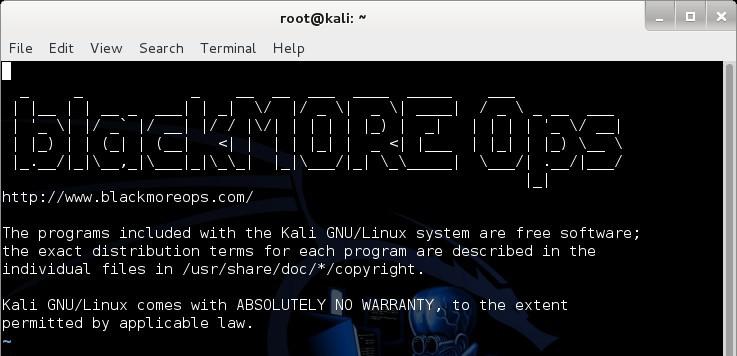
Now the usual SSH MOTD (Message of the Day – Banner) is boring. I want my name on that and add some useful info. Following is what a usual MOTD looks like:

Well, that’s just plain and boring for me.

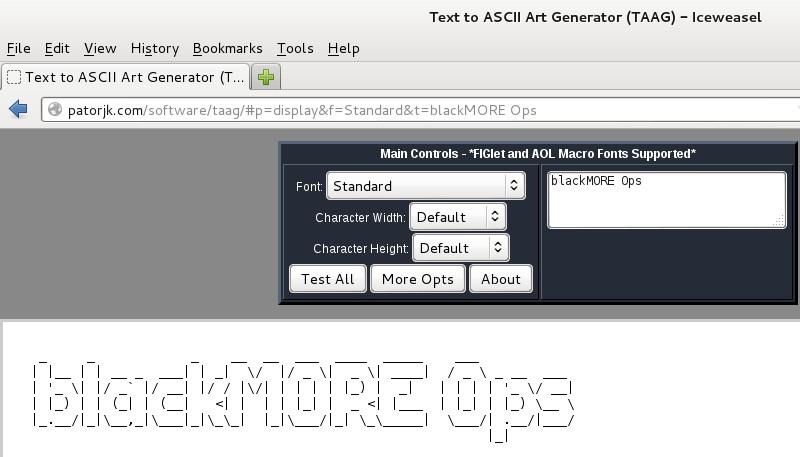
Go to http://patorjk.com/software/taag/
Type something in “Type Something” Box! Play around with the settings and you get a nice ASCII art.

Kali Linux remote SSH - How to configure openSSH server - blackMORE Ops -4

Edit the following file and add your text.
root@kali:~# vi /etc/motd 
root@kali:~# service ssh restart
Save the file and restart/reload SSH … both should just work. I’ve added blackMORE Ops as ASCII and http://www.blackmoreops.com/ as a second line…


Kali Linux remote SSH - How to configure openSSH server - blackMORE Ops -66

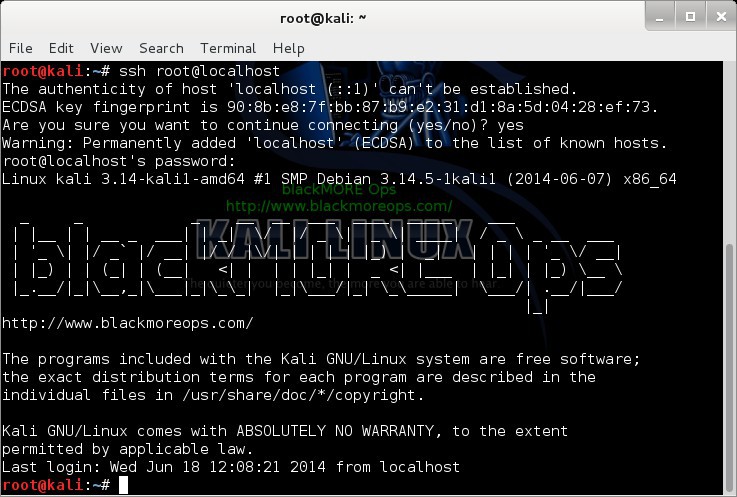
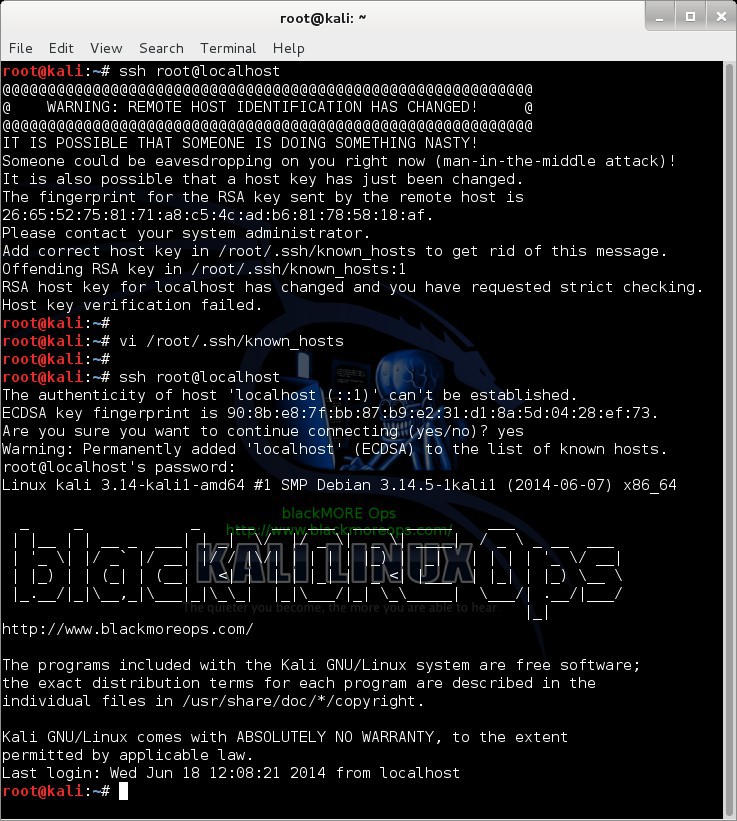
So next time I try to login I get this nice screen with some more info

Kali Linux remote SSH - How to configure openSSH server - blackMORE Ops -7

Pretty cool!

Step 5: Troubleshooting

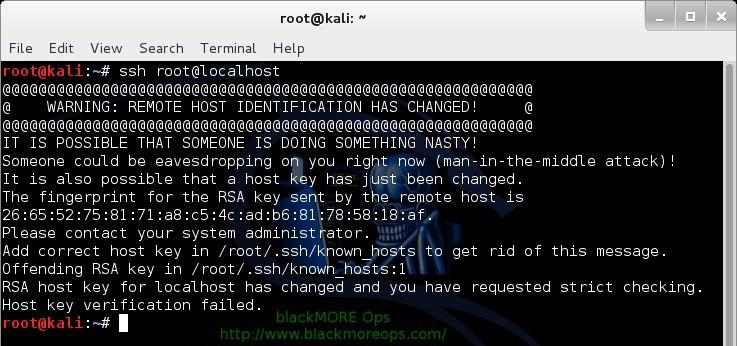
Because I changed SSH keys in the middle of change, (I was logged in before), I had this BIG warning message coming up

 @@@@@@@@@@@@@@@@@@@@@@@@@@@@@@@@@@@
@ WARNING: REMOTE HOST IDENTIFICATION HAS CHANGED! @
@@@@@@@@@@@@@@@@@@@@@@@@@@@@@@@@@@@
IT IS POSSIBLE THAT SOMEONE IS DOING SOMETHING NASTY!
Someone could be eavesdropping on you right now (man-in-the-middle attack)!
It is also possible that the RSA host key has just been changed.
The fingerprint for the RSA key sent by the remote host is
26:65:52:75:81:71:a8:c5:4c:ad:b6:81:78:58:18:af.
Please contact your system administrator.
Add correct host key in /root/.ssh/known_hosts to get rid of this message.
Offending key in /root/.ssh/known_hosts:1
RSA host key for localhost has changed and you have requested strict checking.
Host key verification failed.
 
It kicked me right out.

Kali Linux remote SSH - How to configure openSSH server - blackMORE Ops -111


Usually this is the sign of something bad. As you can see MITM attacks does this:

 IT IS POSSIBLE THAT SOMEONE IS DOING SOMETHING NASTY!
Someone could be eavesdropping on you right now (man-in-the-middle attack)!
 
This was the reason I changed Kali Linux default key (You wouldn’t even notice MITM if you’re using the default key).
This is a rather easy fix. You just need to delete the offending line in known_hosts file.

 Add correct host key in /root/.ssh/known_hosts to get rid of this message.
Offending key in /root/.ssh/known_hosts:1
 
Use the following command:
root@kali:~# vi /root/.ssh/known_hosts
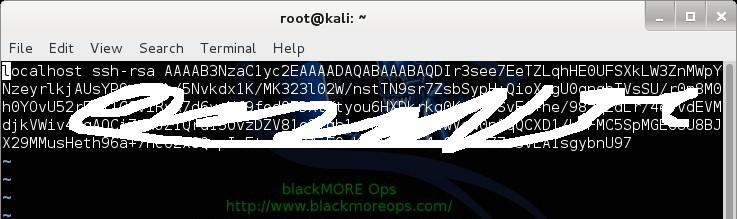
Following was the key I had

Kali Linux remote SSH - How to configure openSSH server - blackMORE Ops -122

Just delete the line, save the file and try to SSH again.

Kali Linux remote SSH - How to configure openSSH server - blackMORE Ops -133

and it worked.

Step 6: Change SSH server port for extra safety

As a last step and just to be sure, you should also change SSH port from 22 to something else. (any port between 10000-64000 is okay)
Make a backup of existing SSH config file.
root@kali:/etc/ssh#  cp /etc/ssh/sshd_config /etc/ssh/sshd_config_backup
Edit the SSH_Config file.
root@kali:/etc/ssh#  vi /etc/ssh/sshd_config
Look for the following line:
    #Port 22
Change the line so it looks like this:
    Port 10101
Restart OpenSSH server
root@kali:/etc/ssh#  service ssh restart
Next time you SSH, you use the following command:
root@kali:~#  ssh username@myhostnaname.com -p 10101
Where
  1. username@myhostnaname.com = Username and Hostname where hostname can be an IP or FQDN.
  2. -p = Port
  3. 10101 = Destination Port

Conclusion:

SSH is typically used to log into a remote machine and execute commands, but it also supports tunneling, forwarding TCP ports and X11 connections; it can transfer files using the associated SSH file transfer (SFTP) or secure copy (SCP) protocols. SSH uses the client-server model.
The standard TCP port 22 has been assigned for contacting SSH servers. If you scan for this port using NMAP, you will see many servers has it open to the world and you can try to bruteforce it and gain access.
An SSH client program is typically used for establishing connections to an SSH daemon accepting remote connections. Both are commonly present on most modern operating systems, including Mac OS X, most distributions of GNU/Linux, OpenBSD, FreeBSD, NetBSD, Solaris and OpenVMS. Notably, Windows is one of the few modern desktop/server OSs that does not include SSH by default. Some common SSH clients includes
  1. PuTTY
  2. Cygwin
  3. WinSCP
and they all provide similar file management (synchronization, copy, remote delete) capability using PuTTY as a back-end.

Both WinSCP and PuTTY are available packaged to run directly off of a USB drive, without requiring installation on the client machine. Setting up a SSH server in Windows typically involves installation (e.g. via installing Cygwin, or by installing a stripped down version of Cygwin with the SSH server.
SSH is important in cloud computing to solve connectivity problems, avoiding the security issues of exposing a cloud-based virtual machine directly on the Internet. An SSH tunnel can provide a secure path over the Internet, through a firewall to a virtual machine.

Source with thanks to blackmoreops.com

~ vendredi 11 juillet 2014 0 commentaires